Good Bug Reporting
A typical software development process consists of
- Business Analysis team
- Engineering team
- QA team
- Management
Business analysis team
- Concerned with generation of business requirements.
- Are more aware of business aspects than technical aspects.
Engineering team
- Technically oriented
- They consider that the project is their “BABY”.
- Often runs into the QA team on minor misunderstandings.
QA team
- Test to break
- Communicates bugs to the Engineering team.
- Most often runs into confrontation with the Engineering team.
- Are the most misunderstood of the lot for their BREAKING work
Improving Software work products
- Basic objective of the software development process is to develop a quality product for the customer
How is it achieved?
- By developing and testing repeatedly until the desired objectives are met.
Dependencies
- Having a good cycle time between development and testing
- Proper synchronizing between the teams.
- Minimum discrepancies in report which translates down to efficient work cycle.
Bug Report
- The mainstay of the QA team.
- Communicates entire scenarios to the Engineering team for faster resolution and subsequent closure of the bug, hence the bug report must be GOOD and EASY TO UNDERSTAND.
Why Good Bug Report is needed?
- Effective communication on perceived problems/ issues to the Engineering team.
- A good bug report commands respect.
- An effective bug report ensures that nearly all the bugs are fixed/ resolved.
Why do we write bug reports?
- During the testing process, we encounter number of deviations.
- These deviations are put down and communicated to the developer.
- The developer tries to recreate the issue.
- If found, it is resolved/ fixed.
Ineffective report.
- On attempt to recreate, the issue does not crop up.
- The developer finds it difficult to understand and recreate.
- The bug details are ambiguous.
Effect
- The bugs are not fixed.
- What is the tester’s job?
- Report the bug in its true form.
- Put in elaborate details for understandability.
- Ensure that the bug is reproducible.
Good Bug Report – Features
# Your bug detail should have a unique bug ID.
- Easy for traceability
- Easy to automate , if required
- Uniquely identifies an issue to facilitate retrieval and action.
# Your bug should be reproducible
- A reproducible bug ensures resolution
- Every detail to be included in the steps to recreate
- Enables the developer to trace the steps and fix the bug accordingly.
# Be specific in reporting
- A bug detail should include details about a specific issue only.
- The detail should not combine and try to explain different scenarios
- Summary to be included within 100 characters and should clearly indicate what the bug is about.
Bug Report – Format
A typical bug report should contain
- Bug ID
- Reporter
- Product
- Version
- Component
- Platform
- Operating system
- Priority
- Severity
- Status
- Assign to
- URL
- Summary
- Description
- Steps to recreate
- Expected result
- Actual result
- Snapshots (if any)
- Attachments
Additional Tips
# Report the problem immediately
- Will ensure that you do not forget the steps
# Attempt to reproduce the bug atleast thrice before reporting
- Will ensure that the bug is clear, concise and easily understood by the developer.
# Test the bug across similar modules within the application.
- Chances are high to have the bug in other modules too.
# Good bug summary
- A typical summary is written in 100 characters, should comprise of only one sentence.
- Enables the reader to immediately get the gist of the bug.
- Facilitates manual search when the user wants to search for the bug.
# Do a self review before confirming the bug
- A self review will ensure that discrepancies are removed and you have the bug details put in clearly.
- Remove ambiguous sentence from the report.
- Keep off misleading words.
# Avoid rough, abusive language.
- Do not use the bug report to underestimate, criticize or attack the developer.
- It should command respect from the other teams.
# Do not submit proprietary code in the bug report.
- For proprietary code, create a sample to illustrate.
Bug Report – An Example
Bug ID : 101
Reporter : Abhilash Gopi
Product : School Management (SMgmt)
Version : 1.2.7
Component : TimeTable Creation (TIMETABLE_CREATION.ASP)
Platform : Desktop machine (PII)
Operating system: Windows 2K, Windows XP
Priority : High
Severity : High
Status : New
Assign to : Abu
URL : http://SMgmt/TimeTable_creation.asp
Summary : Creation process for timetable takes an unusually long time (as high as 2 hours).
Description :
Tested Date : Feb.14, 2008.
Pre-requisite : Ensure that there are data available for atleast one class before timetable generation can be scheduled.
When the user selects the option "Schedule >> Time Table Generation", it is found to take an unusally long time to generate the time table.
Steps to recreate :
1) Invoke the School management application in the browser.
2) Login with appropriate username/ password (admin/admin)
3) Go to Schedule >> Time Table Generation"
4) Note that the generation process takes around 2 hours and more to generate the timetable.
Expected result:
The timetable generation process takes a long time to complete.
Actual result:
Time table generation being an important part of the application should be completed in a fairly less time.
Snapshots (if any):
Please find attached the image snapshot for your reference.
Attachments
Showing posts with label Software Testing. Show all posts
Showing posts with label Software Testing. Show all posts
Tuesday, February 17, 2009


Tuesday, November 11, 2008
Performance Testing Basics

Performance Testing Basics.
Performance testing activity has long been considered a niche area by most software companies. This has been primarily due to the high cost of the tools involved. With the Open Source carving a space for themselves in the world of software tools, it is time companies realized that they too can afford and contribute to performance testing. They too are in a position to offer their services to their clients.
What is needed?
1) First, loads and loads of patience to go about the performance testing task.
2) The ability to understand the application and try and find out ways to conduct an effective test.
3) A bit of technical knowledge does help since it helps you to pinpoint and analyze the possible bottlenecks.
How it is done?
1) Initially the application is tested with 1 user. This is done to know the basic empty cache performance criteria. It is similar to starting
a car on a cold winter morning.
2) Once the cache is taken care of by having the single user test, the users are incremented in the following mode (10, 25, 50, 75, 100, 125 … in the increments of 25 or 50 as may be deemed fit).
NOTE : For each user, say for example 10 users, it is required to generate atleast 10 to 15 test outputs so that we know the application behaves consistently across the 10 or 15 readings. This has to be done for all the other set of users.
3) From these output readings, we arrive at the average and then record it separately.
4) Once the average response times are taken for all the set of users, we can plot a separate graph which shows the actual deterioration of the application at a particular point in time.
By the end of the testing cycle, we realize we have executed the script nearly 150 times or more in order to test the performance. But it is worth the effort to give us the required insight.
This is what the final report will resemble.
Most preferred Open Source Performance testing tools :
- OpenSTA
- JMeter
White Box Testing - Part V
Loop Testing
• Loop testing is the testing of resource(s) multiple times under program control.
• The most important aspect of this test is to ensure that the control loop is executed multiple times and exited when a particular condition is satisfied.
# Typical bugs that arise are
• Variable not incremented, hence an infinite loop is established,
• Specifying the loop exit criteria incorrectly, hence the resultant output will be incorrect.
# Typical examples are
While not rs.EOF then
statement 1
statement 2
rs.MoveNext
Wend
Will generate an infinite loop, due to non-availability of the next incrementing record.
Important tip for Loop testing
• Note that unstructured loops are not to be tested.
• They need to be RE-DESIGNED for better performance.
Summary
• Ensuring an effective White Box test for your code, will generate an efficient, and
performance oriented code, will less memory leaks and unwanted memory
usage.
• Needs to be done with a lot of concentration and dedication.
• Usage of data flow graph is an effective tool for reducing unwanted data
declaration and usage.
Other Techniques/ Tools
# Profiling tool :
• Helps the tester to uncover bottlenecks as regards performance.
• Uncovers memory leaks and memory access errors.
# Code Based Fault Injection.
• Changes program states by injecting software source code to force changes into the state of the program as it executes.
• this technique forces non-normative behavior of the software, and the resulting
understanding can help determine whether a program has vulnerabilities that can lead to security violations.
• This technique can be used to force error conditions to exercise the error handling code, change execution paths, input unexpected (or abnormal) data, change return values, etc.
Abuse Cases
• Abuse cases help security testers view the software under test in the same light as
attackers do .
• With access to the source code, a tester is in a better position to quickly see where the weak spots are compared to an outside attacker.
• The simplest, most practical method for creating abuse cases is usually through a
process of informed brainstorming, involving security, reliability, and subject matter expertise.
Error Handling techniques
• Testing Exceptions and error-handling should be verified thoroughly by simulating partial and complete fails.
• Proper error recovery, notification and logging should be checked.
Transactions test
• This test is employed for Data test as regards database.
• Systems that employ transaction (either local or distributed) should be validated to ensure ACID (Atomicity, Consistency, Isolation,
Durability).
Thank you, Everybody
• You can use these techniques for those little programs you create, so that you are confident on creating efficient, performance oriented programs.
• Do get back for any clarification, whatsoever.
• Loop testing is the testing of resource(s) multiple times under program control.
• The most important aspect of this test is to ensure that the control loop is executed multiple times and exited when a particular condition is satisfied.
# Typical bugs that arise are
• Variable not incremented, hence an infinite loop is established,
• Specifying the loop exit criteria incorrectly, hence the resultant output will be incorrect.
# Typical examples are
While not rs.EOF then
statement 1
statement 2
rs.MoveNext
Wend
Will generate an infinite loop, due to non-availability of the next incrementing record.
Important tip for Loop testing
• Note that unstructured loops are not to be tested.
• They need to be RE-DESIGNED for better performance.
Summary
• Ensuring an effective White Box test for your code, will generate an efficient, and
performance oriented code, will less memory leaks and unwanted memory
usage.
• Needs to be done with a lot of concentration and dedication.
• Usage of data flow graph is an effective tool for reducing unwanted data
declaration and usage.
Other Techniques/ Tools
# Profiling tool :
• Helps the tester to uncover bottlenecks as regards performance.
• Uncovers memory leaks and memory access errors.
# Code Based Fault Injection.
• Changes program states by injecting software source code to force changes into the state of the program as it executes.
• this technique forces non-normative behavior of the software, and the resulting
understanding can help determine whether a program has vulnerabilities that can lead to security violations.
• This technique can be used to force error conditions to exercise the error handling code, change execution paths, input unexpected (or abnormal) data, change return values, etc.
Abuse Cases
• Abuse cases help security testers view the software under test in the same light as
attackers do .
• With access to the source code, a tester is in a better position to quickly see where the weak spots are compared to an outside attacker.
• The simplest, most practical method for creating abuse cases is usually through a
process of informed brainstorming, involving security, reliability, and subject matter expertise.
Error Handling techniques
• Testing Exceptions and error-handling should be verified thoroughly by simulating partial and complete fails.
• Proper error recovery, notification and logging should be checked.
Transactions test
• This test is employed for Data test as regards database.
• Systems that employ transaction (either local or distributed) should be validated to ensure ACID (Atomicity, Consistency, Isolation,
Durability).
Thank you, Everybody
• You can use these techniques for those little programs you create, so that you are confident on creating efficient, performance oriented programs.
• Do get back for any clarification, whatsoever.
White Box Testing - Part IV
Data Flow Testing
• Data Flow testing targets the lifecycle of a particular piece of data (i.e. a variable) in an application.
• The technique to implement an effective Data Flow testing is to look for patterns of data usage based on which risky areas of the code can be found and more test
cases can be applied.
Let’s see some basics as regards DATA.
# DATA is used in 4 ways
• (D)efined,
• (U)sed in a predicate,
• (U)sed in a calculation, and
• (K)illed.
E.g.
• Usage of a piece of data in a calculation after
it has been killed, show an anomaly in the
code; Therefore a bug.
# Most Failures involve
• Execution of an incorrect definition
• Incorrect assignment or input statement
• Predicate is faulty
• Definition is missing
• Explore the sequences of events related to the data state and the unreasonable things that can happen to data.
• Explore the effect of using the value produced by each and every computation.
• Considerable effort needs to be given to data declaration statements, since most of
the code contains nearly half of the contents as data declaration.
Some examples are given below
• Sum = expression
• Read (var1, var2, var3)
• Write (total1, total2, total3)
• Method call : CompareValue(val1, val2)
• While : while Boolean do statements
• For statement : for (val1 = init to final)
• If then else : If Boolean then S1;
if Boolean then S1 else S2.
• case : Case var1:
Statement 1:
Statement 2:
# Use the techniques given below for an effective data flow test.
• DD -bug
• DK -bug
• DU – normal
• KD – normal
• KK – harmless, but a bug
• KU – bug
• UD – normal
• UK – normal
• UU -normal
where
D - Define / U - Use / K - Kill
• Data Flow testing targets the lifecycle of a particular piece of data (i.e. a variable) in an application.
• The technique to implement an effective Data Flow testing is to look for patterns of data usage based on which risky areas of the code can be found and more test
cases can be applied.
Let’s see some basics as regards DATA.
# DATA is used in 4 ways
• (D)efined,
• (U)sed in a predicate,
• (U)sed in a calculation, and
• (K)illed.
E.g.
• Usage of a piece of data in a calculation after
it has been killed, show an anomaly in the
code; Therefore a bug.
# Most Failures involve
• Execution of an incorrect definition
• Incorrect assignment or input statement
• Predicate is faulty
• Definition is missing
• Explore the sequences of events related to the data state and the unreasonable things that can happen to data.
• Explore the effect of using the value produced by each and every computation.
• Considerable effort needs to be given to data declaration statements, since most of
the code contains nearly half of the contents as data declaration.
Some examples are given below
• Sum = expression
• Read (var1, var2, var3)
• Write (total1, total2, total3)
• Method call : CompareValue(val1, val2)
• While : while Boolean do statements
• For statement : for (val1 = init to final)
• If then else : If Boolean then S1;
if Boolean then S1 else S2.
• case : Case var1:
Statement 1:
Statement 2:
# Use the techniques given below for an effective data flow test.
• DD -bug
• DK -bug
• DU – normal
• KD – normal
• KK – harmless, but a bug
• KU – bug
• UD – normal
• UK – normal
• UU -normal
where
D - Define / U - Use / K - Kill
White Box Testing - Part III
White Box testing types
• We have the following types for White box testing based on the technicalities
• Code Coverage Analysis (includes)
• Basis Path Testing
• Flow Graph Notation,
• Cyclomatic complexity,
• Control Structure Testing
• Conditions Testing,
• Data flow testing,
• Loop Testing.
Basis Path Testing
• This is a testing mechanism proposed by McCabe,
• The aim of this testing is to derive the logical complexity measure of a procedural design and use this information as a guide for defining a
basic set of execution paths.
• The resulting test cases will ensure that the basic set of paths will execute every statement at least once.
Flow Graph Notation
• It is a representation, using graph notation, of all paths that might be traversed
through a program during its execution,
• Each Node in the graph represents a basic block,
• Directed edges are used to represent jumps in the control flow,
• There should exist two blocks (Entry Block and Exit Block)
• Entry Block : through which control enters into the flow graph,
• Exit Block : through which all control flow leaves.
Flow Graph Notation : Example
• Consider the following code
0: (A) t0 = read_num
1: (A)ift0mod 2 ==0goto 4
2: (B) print t0 + " is odd."
3: (B) goto 5
4: (C) print t0 + " is even."
5: (D) end program

• In the given example, we have 4 basic blocks named A, B, C, D.
• A from line 0 to 1, B from line 2 to 3, C for line 4, and D for line 5.
• Here A is the entry block, and D is the Exit block.
• Lines 4 and 5 are JUMP TARGETS.
Cyclomatic Complexity
• It is a measurement concept developed by McCabe.
• It is used to measure the complexity of a program.
• It measures the number of linearly independent paths through a program.
• It is computed using a graph that describes the control flow of the program,
• The nodes of the graph corresponds to the commands of a program.
• A directed edge connects two nodes if the second command is executed immediately
after the first command.
• It is given by
M=E–N+P
• Where M = cyclomatic complexity
• E = number of edges of the graph
• N = number of nodes of the graph
• P = number of connected components.
• A simple way to determine the cyclomatic number is M = number of closed loops + 1
• It provides an upper bound for number of tests required to guarantee coverage of all program statements.
• It is denoted by V(G) and is given by
V(G) = (# Edges) – (#Nodes) + 1
Control Structure Testing
• In programming, statements are typically executed one after the other and in the
order they are written. However most programming languages have CONTROL
FLOW statements which allow variation in this sequential order.
# Control structures have the following characteristics.
• Statements may only be obeyed under certain conditions (choice statements),
• Statements may be obeyed repeatedly, (looping structures),
• A group of statements may be obeyed (subroutines).
• It consists of the following individual tests.
a) Condition testing,
b) Data Flow testing
c) Loop Testing.
Condition Testing
• The basis for carrying out CONDITION TESTING is the representation of the flow
of control within a program/ subprogram.
• The most important aspect is to ensure that the Boolean controlling expressions
are adequately tested.
• The process of CONDITION TESTING ensures that a controlling expression has
been adequately exercised by constructing a CONSTRAINT SET for every expression
and ensuring that every item in the CONSTRAINT SET is included to test the
expression.
E.g.
• If DateValid then
• While NOT DateValid then
The CONSTRAINT SET for both these expressions is {t,f} which indicates that to
adequately test these expressions they should be tested twice with DateValid
having the values True and False.
• Expanding the Constraint Set, we have the following set of values to be exercised.
{{t,t{ {t,f} {f,t} {f,f}}
• When the simple boolean expression is combined with a relational expression,
then the Constraint set will include more items.
• If only the left hand Boolean value is a relational expression the condition set would be
{{= ,t } {=,f }{> ,t}{< ,t } {>,f } {< ,f }}
• If both Boolean values are relational expressions the condition set would become {{=,=}{=,> }{=,<}{>,=}{<,=} {>,>}{>,< }{<,>} {< ,< }}
• We have the following types for White box testing based on the technicalities
• Code Coverage Analysis (includes)
• Basis Path Testing
• Flow Graph Notation,
• Cyclomatic complexity,
• Control Structure Testing
• Conditions Testing,
• Data flow testing,
• Loop Testing.
Basis Path Testing
• This is a testing mechanism proposed by McCabe,
• The aim of this testing is to derive the logical complexity measure of a procedural design and use this information as a guide for defining a
basic set of execution paths.
• The resulting test cases will ensure that the basic set of paths will execute every statement at least once.
Flow Graph Notation
• It is a representation, using graph notation, of all paths that might be traversed
through a program during its execution,
• Each Node in the graph represents a basic block,
• Directed edges are used to represent jumps in the control flow,
• There should exist two blocks (Entry Block and Exit Block)
• Entry Block : through which control enters into the flow graph,
• Exit Block : through which all control flow leaves.
Flow Graph Notation : Example
• Consider the following code
0: (A) t0 = read_num
1: (A)ift0mod 2 ==0goto 4
2: (B) print t0 + " is odd."
3: (B) goto 5
4: (C) print t0 + " is even."
5: (D) end program

• In the given example, we have 4 basic blocks named A, B, C, D.
• A from line 0 to 1, B from line 2 to 3, C for line 4, and D for line 5.
• Here A is the entry block, and D is the Exit block.
• Lines 4 and 5 are JUMP TARGETS.
Cyclomatic Complexity
• It is a measurement concept developed by McCabe.
• It is used to measure the complexity of a program.
• It measures the number of linearly independent paths through a program.
• It is computed using a graph that describes the control flow of the program,
• The nodes of the graph corresponds to the commands of a program.
• A directed edge connects two nodes if the second command is executed immediately
after the first command.
• It is given by
M=E–N+P
• Where M = cyclomatic complexity
• E = number of edges of the graph
• N = number of nodes of the graph
• P = number of connected components.
• A simple way to determine the cyclomatic number is M = number of closed loops + 1
• It provides an upper bound for number of tests required to guarantee coverage of all program statements.
• It is denoted by V(G) and is given by
V(G) = (# Edges) – (#Nodes) + 1
Control Structure Testing
• In programming, statements are typically executed one after the other and in the
order they are written. However most programming languages have CONTROL
FLOW statements which allow variation in this sequential order.
# Control structures have the following characteristics.
• Statements may only be obeyed under certain conditions (choice statements),
• Statements may be obeyed repeatedly, (looping structures),
• A group of statements may be obeyed (subroutines).
• It consists of the following individual tests.
a) Condition testing,
b) Data Flow testing
c) Loop Testing.
Condition Testing
• The basis for carrying out CONDITION TESTING is the representation of the flow
of control within a program/ subprogram.
• The most important aspect is to ensure that the Boolean controlling expressions
are adequately tested.
• The process of CONDITION TESTING ensures that a controlling expression has
been adequately exercised by constructing a CONSTRAINT SET for every expression
and ensuring that every item in the CONSTRAINT SET is included to test the
expression.
E.g.
• If DateValid then
• While NOT DateValid then
The CONSTRAINT SET for both these expressions is {t,f} which indicates that to
adequately test these expressions they should be tested twice with DateValid
having the values True and False.
• Expanding the Constraint Set, we have the following set of values to be exercised.
{{t,t{ {t,f} {f,t} {f,f}}
• When the simple boolean expression is combined with a relational expression,
then the Constraint set will include more items.
• If only the left hand Boolean value is a relational expression the condition set would be
{{= ,t } {=,f }{> ,t}{< ,t } {>,f } {< ,f }}
• If both Boolean values are relational expressions the condition set would become {{=,=}{=,> }{=,<}{>,=}{<,=} {>,>}{>,< }{<,>} {< ,< }}
Thursday, October 23, 2008
Good Bug Report
Bug Report
It is the main interface of the technical team to the world of defects/ bugs/ deviations.
Why do you require a good bug report?
A good bug report is required in order to let know the technical team that there exists deviations in the application/ module/ system.
What is a good bug report?
- A bug report is said to be good, if it is effective.
- Effective necessarily means that the bugs will definitely be fixed, because the technical team has understood what is written in the bug report.
- Understanding what is written means that the chance of fixing are HIGHER.
Typical scenarios involving an inappropriate/ incomplete/ ineffective bug report.
- Suppose the tester does not report the bugs in the appropriate manner, chances are
a) Programmer will most likely reject the bug (because they haven't understood anything). The bug can be set as IRREPRODUCIBLE.
b) We will lose valuable time in trying to explain to the developer. By that time, we would have forgotten the scenarios that led to the bug.
Characteristics/ Features of a Bug report
1) A bug should have a unique bug id
- Every bug should have a unique number associated to it. THis will help in indentifying the bug record/ details.
- In the case of an automated tool being used for recording defects/ bugs, the tool will generate the unique bug id.
2) The bug to be explained specific to the problem at hand- A typical mistake made by the testers is to write an essay/ paragraph to explain the bug.
- You should try to explain in points
- Be very specific and to the point in explaining the bug in the related scenarios.
- The summary to the bug should be less than or equals 100 characters and should not exceed a sentence. It should be summarized within a sentence and that too effectively too.
- Do not link and write about two bugs in the same description even though they are related to the same scenario or seem to be similar.
3) The bug should be reproducible- Remember that if the bug is not Reproducible then it will never be fixed.
- Indicate with a separate section called "Steps to Recreate".
- Never, Never skip any step assuming that the technical team will understand the step no matter how trivial the step is.
A typical Bug Report template
Bug ID : [A unique number associated to the bug]
Reporter: [Your name] [email address to ease the feedback and communication]
Product: [The related product in which the bug was found]
Version: [The version of the product]
Component: [It could be related to submodules/ subsections, whichever applicable to your application]
Platform: [Indicate the platform if you are involved in multi-platform testing] E.g. Desktop, Server. etc.
Operating system: [Indicate the operation system] E.g. Windows, Linux, Unix. etc.
Priority: [An indication of when the bug should be fixed. It is set typically from P1 to P5 with P1 as the highest priority and to be fixed asap and P5 with the lowest priority]
Severity: [Indicating how severe the bug is]
Typical severity levels are
- Blocker: No further testing work can be done.
- Critical: Application crash, Loss of data.
- Major: Major loss of function.
- Minor: minor loss of function.
- Trivial/ Low: UI enhancements, typographical mistakes
- Enhancement: Request for new feature or few enhancements in existing application.
Status: [indicates the status of the bug as it travels through the defect workflow]
Typical Status levels are- New
- Fixed
- Verified
- ReOpened
- Won't Fix
- Future Fix
- Duplicate etc.
Assign To: [The person to whom the bug is assigned to for work, rework, resolution, closue etc.]
URL:[The URL on which the bug was found]
Summary: [A brief summary of the bug]
Characteristics of the summary are
- Should be utmost 100 characters or less.
- It clearly indicates the problem
- having it less than 60 characters makes a lot of sense, since it is easily comprehensible.
Description: [Detailed description of the bug]
It should include
- An expanded summary line
- Steps to Recreate : show the steps correctly in sequence and clear to understand.
- Expected REsult : Illustrate the expected behavior of the application
- Actual Result : What did you find in the current scenario. In short it is the bug behavior.
Bug Type : [Indicates the type of the bug]
Typical bug types are
- Coding error
- Design error
- New Feature
- Documentation
- Hardware problem
- Rework
Tips to write a good bug report
1) Wring the bug report immediately
The moment you find the bug, do write it immediately. If you plan to write it later, chances are that you will forget some of the detailed steps that you had undertaken in order to find the bug.
2) Try to reproduce the bug atleast thrice before writing the bug report
You should make it a habit to try and reproduce the bug atleast thrice before you report it. If you find that the bug is not reproducible, then chances are that it may or may not get fixed.
3) Do test the same bug to verify if it appears in other related or similar module
Most developers use the same code in different modules , which may be related to each other. So there is every possibility that the bug could occur in all such modules.
4) Have a very good bug summary
A bug summary will enable the technical team to identify the bug and understand it. They will be able to easily comprehend the deviation and identify the root cause related to the bug. Having a good bug summary eases the difficulty encountered in trying to understand the bug and it also aids in fixing the bug earlier. In the long run, it reduces the development and testing time.
5) Do not use a degrading language in your bug report.
- Never ever point accussing fingers through your bug report.
- Never discredit a developer/ programmer.
6) Always read the entire bug report before submitting
- Remove sentences that create ambiguity and hence misinterpretation.
- read the entire bug report to verify if it makes sense to you.
- If possible, ask your neighbour to read the bug report and ask her/ him their interpretation of the report.
Summary - A bug report should be easy to understand, clear, and to the point
- It is the main interface of the technical team to the world of deviations.
- The tester should take it as a prime responsibility to write a good bug report.
- A good report will reduce development and testing time considerably.
Example of a Bug Report.
Defect ID :947
Status : Open
Severity : Medium
Summary :
User Account : Script Error encountered when the user tries to create an user account
Description
When the user tries to create an user account from the login screen, a script error is encountered.
Steps to recreate
1) Invoke the login page.
2) Click Create User available at the bottom of the page.
3) The user will be navigated to a user account creation page.
4) Enter relevant details for the user.
5) Click the checkbox for the label "I agree to the terms of use and privacy policy".
6) Note the script error that comes up.
Please refer to the attachment.
Expected Result : The user should be able to successfully create an user account.
Actual result : The user encounters a script error when trying to create an user account.
Snapshots (if any).
It is the main interface of the technical team to the world of defects/ bugs/ deviations.
Why do you require a good bug report?
A good bug report is required in order to let know the technical team that there exists deviations in the application/ module/ system.
What is a good bug report?
- A bug report is said to be good, if it is effective.
- Effective necessarily means that the bugs will definitely be fixed, because the technical team has understood what is written in the bug report.
- Understanding what is written means that the chance of fixing are HIGHER.
Typical scenarios involving an inappropriate/ incomplete/ ineffective bug report.
- Suppose the tester does not report the bugs in the appropriate manner, chances are
a) Programmer will most likely reject the bug (because they haven't understood anything). The bug can be set as IRREPRODUCIBLE.
b) We will lose valuable time in trying to explain to the developer. By that time, we would have forgotten the scenarios that led to the bug.
Characteristics/ Features of a Bug report
1) A bug should have a unique bug id
- Every bug should have a unique number associated to it. THis will help in indentifying the bug record/ details.
- In the case of an automated tool being used for recording defects/ bugs, the tool will generate the unique bug id.
2) The bug to be explained specific to the problem at hand- A typical mistake made by the testers is to write an essay/ paragraph to explain the bug.
- You should try to explain in points
- Be very specific and to the point in explaining the bug in the related scenarios.
- The summary to the bug should be less than or equals 100 characters and should not exceed a sentence. It should be summarized within a sentence and that too effectively too.
- Do not link and write about two bugs in the same description even though they are related to the same scenario or seem to be similar.
3) The bug should be reproducible- Remember that if the bug is not Reproducible then it will never be fixed.
- Indicate with a separate section called "Steps to Recreate".
- Never, Never skip any step assuming that the technical team will understand the step no matter how trivial the step is.
A typical Bug Report template
Bug ID : [A unique number associated to the bug]
Reporter: [Your name] [email address to ease the feedback and communication]
Product: [The related product in which the bug was found]
Version: [The version of the product]
Component: [It could be related to submodules/ subsections, whichever applicable to your application]
Platform: [Indicate the platform if you are involved in multi-platform testing] E.g. Desktop, Server. etc.
Operating system: [Indicate the operation system] E.g. Windows, Linux, Unix. etc.
Priority: [An indication of when the bug should be fixed. It is set typically from P1 to P5 with P1 as the highest priority and to be fixed asap and P5 with the lowest priority]
Severity: [Indicating how severe the bug is]
Typical severity levels are
- Blocker: No further testing work can be done.
- Critical: Application crash, Loss of data.
- Major: Major loss of function.
- Minor: minor loss of function.
- Trivial/ Low: UI enhancements, typographical mistakes
- Enhancement: Request for new feature or few enhancements in existing application.
Status: [indicates the status of the bug as it travels through the defect workflow]
Typical Status levels are- New
- Fixed
- Verified
- ReOpened
- Won't Fix
- Future Fix
- Duplicate etc.
Assign To: [The person to whom the bug is assigned to for work, rework, resolution, closue etc.]
URL:[The URL on which the bug was found]
Summary: [A brief summary of the bug]
Characteristics of the summary are
- Should be utmost 100 characters or less.
- It clearly indicates the problem
- having it less than 60 characters makes a lot of sense, since it is easily comprehensible.
Description: [Detailed description of the bug]
It should include
- An expanded summary line
- Steps to Recreate : show the steps correctly in sequence and clear to understand.
- Expected REsult : Illustrate the expected behavior of the application
- Actual Result : What did you find in the current scenario. In short it is the bug behavior.
Bug Type : [Indicates the type of the bug]
Typical bug types are
- Coding error
- Design error
- New Feature
- Documentation
- Hardware problem
- Rework
Tips to write a good bug report
1) Wring the bug report immediately
The moment you find the bug, do write it immediately. If you plan to write it later, chances are that you will forget some of the detailed steps that you had undertaken in order to find the bug.
2) Try to reproduce the bug atleast thrice before writing the bug report
You should make it a habit to try and reproduce the bug atleast thrice before you report it. If you find that the bug is not reproducible, then chances are that it may or may not get fixed.
3) Do test the same bug to verify if it appears in other related or similar module
Most developers use the same code in different modules , which may be related to each other. So there is every possibility that the bug could occur in all such modules.
4) Have a very good bug summary
A bug summary will enable the technical team to identify the bug and understand it. They will be able to easily comprehend the deviation and identify the root cause related to the bug. Having a good bug summary eases the difficulty encountered in trying to understand the bug and it also aids in fixing the bug earlier. In the long run, it reduces the development and testing time.
5) Do not use a degrading language in your bug report.
- Never ever point accussing fingers through your bug report.
- Never discredit a developer/ programmer.
6) Always read the entire bug report before submitting
- Remove sentences that create ambiguity and hence misinterpretation.
- read the entire bug report to verify if it makes sense to you.
- If possible, ask your neighbour to read the bug report and ask her/ him their interpretation of the report.
Summary - A bug report should be easy to understand, clear, and to the point
- It is the main interface of the technical team to the world of deviations.
- The tester should take it as a prime responsibility to write a good bug report.
- A good report will reduce development and testing time considerably.
Example of a Bug Report.
Defect ID :947
Status : Open
Severity : Medium
Summary :
User Account : Script Error encountered when the user tries to create an user account
Description
When the user tries to create an user account from the login screen, a script error is encountered.
Steps to recreate
1) Invoke the login page.
2) Click Create User available at the bottom of the page.
3) The user will be navigated to a user account creation page.
4) Enter relevant details for the user.
5) Click the checkbox for the label "I agree to the terms of use and privacy policy".
6) Note the script error that comes up.
Please refer to the attachment.
Expected Result : The user should be able to successfully create an user account.
Actual result : The user encounters a script error when trying to create an user account.
Snapshots (if any).
Wednesday, October 22, 2008
Website - Testing Cookies
Website Cookies - Testing
Abhilash Gopi
Dated : 6th Mar., 2008.
Cookies
- Most web applications generate a cookie.
- Cookie- also referred to as the HTTP Cookie.
- Are parcels of text sent by a server to a web browser and are sent back unchanged by the browser each time it accesses the server.
Why are cookies used?
- Used for authenticating, tracking, and maintaining specific information about users. (typically site preference).
- It was first associated with the Unix computing and was called “magic cookie”.
The flip side- There are a lot of concerns as regards cookies.
- It has been the subject of debate for “Internet Privacy”.
- A hacker could create an application with cookies designed to know more about the user’s browsing behavior.
Other concerns- Most modern browsers allow users to decide whether to accept cookies.
- In this case, a rejection may render a site useless (e.g. a shopping site).
What are we gonna discuss?
- What exactly are cookies?
- How they work?
- How to test cookies?
What is cookie?
- A small information stored in text format on the user’s hard disk by the web server.
- This information is later used by the web browser to retrieve information from that machine.
Why cookies are used?
- Cookies are basically the user’s identify and are used to track where the user navigated throughout the web site pages.
How cookies work?
- The HTTP protocol used to exchange information files on the web is used to maintain the cookies.
- Two types of HTTP protocol
• Stateless HTTP
• Stateful HTTP
Stateless HTTP- Does not keep any record of previously accessed web page history.
Persistent Cookie- Have an expiration date and lie on the machine until expiry.
Non-persistent cookies- Stored in the web browser’s memory and is destroyed on closing the browser.
Stateful HTTP- Does keep some history of previous web browser and web server interactions and is used by cookie to maintain the user interactions.

Cookie Format- Whenever user visits a site or page that is using a cookie, small code inside the HTML page writes a text file on the user’s machine called cookie.
- E.g
Set-Cookie: NAME=VALUE; expires=DATE; path=PATH; domain=DOMAIN_NAME;
Cookie Format
- Set-Cookie: Password=D3Br0y3Utr3; expires=DATE+50; path=\; domain=eShopping;
Revise (Cookie identify)
- Name
- Expires
- Path
- domain
Where are cookies stored?
- When any web application writes cookie, it gets saved in a text file on the users disk drive.
- The path where the cookies get stored depends on the browser.
Where are cookies stored?
- IE stores cookies in
C:\Documents and Settings\Default User\Cookies
Or
C:\Documents and Settings\Default user\Local Settings\Temporary Internet Files
Applications implementing cookie
- Shopping cart sites
• Cookies track what the user wants to buy.
- Personalized sites
• When user visits certain pages they are asked which pages they don’t want to visit. User options are stored in cookie until the time the user logs out.
Applications implementing cookie
- User Tracking
• To track number of unique visitors online
- Marketing
• Cookies can be used to display advertisements on user machines. Cookies control these advertisements. The type of advertisement is generated by the cookie.
- User sessions
• Cookies can track user sessions to particular domain using user ID and password.
Test a Cookie
- To devise test cases for testing a cookie, ensure the following
• As a cookie privacy policy make sure that no personal or sensitive data is stored in the cookie.
• If sensitive data do need to be saved in cookie, ensure that the cookie is saved in encrypted format.
• Ensure no overuse of cookies on the site exists.
• Disable the cookies from the browser settings. Ensure that the site works without any exception. See if appropriate messages to enable the cookie are visible. (In this case, you will need to close all browsers, delete all cookies before performing the test)
• Accept/ reject some cookies
• Set browser option to prompt whenever a cookie is being written. Check for major functionality for all combination of cookie enable/ disable.
• Delete cookie
• Allow site to write the cookies and then close all browsers, manually delete the cookie and check behavior of the pages.
• Corrupt the cookies.
• Manually edit the cookies and change the parameters to some vague values.
• In some cases, the cookie refers to some other site.
• Checking deletion of cookies from the web application.
• Sometimes a cookie that is created by a domain will be deleted by same domain
• In case of site implementing action tracking, the cookie should get deleted (e.g. purchasing)
• Testing cookie on multiple browsers
• Test for same user on multiple browsers on different machines
• Test on different browser environments
• IE, FireFox, Netscape, Opera etc.
• Change the querystring for logged in user and verify if access is provided.
Suggestions as a Tester
=>
Suggestions you can provide
- The security measure suggestions you can provide:
• Use non-persistent cookies instead of persistent cookies.
• If you must use persistent cookies, then specify a short duration for the cookie's life. The longer the time until cookie expiration, the larger the risk.
Security Suggestions
• Use the secure tag, so that the cookie is sent only if a secure channel (https) is being used.
• Encrypt the information in the cookies. Some web sites split one cookie into many cookies that are further encrypted.
• Avoid application features that use persistent cookies to store privacy-related information. Example: Sites that say “Please check to remember user name and password.”
Abhilash Gopi
Dated : 6th Mar., 2008.
Cookies
- Most web applications generate a cookie.
- Cookie- also referred to as the HTTP Cookie.
- Are parcels of text sent by a server to a web browser and are sent back unchanged by the browser each time it accesses the server.
Why are cookies used?
- Used for authenticating, tracking, and maintaining specific information about users. (typically site preference).
- It was first associated with the Unix computing and was called “magic cookie”.
The flip side- There are a lot of concerns as regards cookies.
- It has been the subject of debate for “Internet Privacy”.
- A hacker could create an application with cookies designed to know more about the user’s browsing behavior.
Other concerns- Most modern browsers allow users to decide whether to accept cookies.
- In this case, a rejection may render a site useless (e.g. a shopping site).
What are we gonna discuss?
- What exactly are cookies?
- How they work?
- How to test cookies?
What is cookie?
- A small information stored in text format on the user’s hard disk by the web server.
- This information is later used by the web browser to retrieve information from that machine.
Why cookies are used?
- Cookies are basically the user’s identify and are used to track where the user navigated throughout the web site pages.
How cookies work?
- The HTTP protocol used to exchange information files on the web is used to maintain the cookies.
- Two types of HTTP protocol
• Stateless HTTP
• Stateful HTTP
Stateless HTTP- Does not keep any record of previously accessed web page history.
Persistent Cookie- Have an expiration date and lie on the machine until expiry.
Non-persistent cookies- Stored in the web browser’s memory and is destroyed on closing the browser.
Stateful HTTP- Does keep some history of previous web browser and web server interactions and is used by cookie to maintain the user interactions.

Cookie Format- Whenever user visits a site or page that is using a cookie, small code inside the HTML page writes a text file on the user’s machine called cookie.
- E.g
Set-Cookie: NAME=VALUE; expires=DATE; path=PATH; domain=DOMAIN_NAME;
Cookie Format
- Set-Cookie: Password=D3Br0y3Utr3; expires=DATE+50; path=\; domain=eShopping;
Revise (Cookie identify)
- Name
- Expires
- Path
- domain
Where are cookies stored?
- When any web application writes cookie, it gets saved in a text file on the users disk drive.
- The path where the cookies get stored depends on the browser.
Where are cookies stored?
- IE stores cookies in
C:\Documents and Settings\Default User\Cookies
Or
C:\Documents and Settings\Default user\Local Settings\Temporary Internet Files
Applications implementing cookie
- Shopping cart sites
• Cookies track what the user wants to buy.
- Personalized sites
• When user visits certain pages they are asked which pages they don’t want to visit. User options are stored in cookie until the time the user logs out.
Applications implementing cookie
- User Tracking
• To track number of unique visitors online
- Marketing
• Cookies can be used to display advertisements on user machines. Cookies control these advertisements. The type of advertisement is generated by the cookie.
- User sessions
• Cookies can track user sessions to particular domain using user ID and password.
Test a Cookie
- To devise test cases for testing a cookie, ensure the following
• As a cookie privacy policy make sure that no personal or sensitive data is stored in the cookie.
• If sensitive data do need to be saved in cookie, ensure that the cookie is saved in encrypted format.
• Ensure no overuse of cookies on the site exists.
• Disable the cookies from the browser settings. Ensure that the site works without any exception. See if appropriate messages to enable the cookie are visible. (In this case, you will need to close all browsers, delete all cookies before performing the test)
• Accept/ reject some cookies
• Set browser option to prompt whenever a cookie is being written. Check for major functionality for all combination of cookie enable/ disable.
• Delete cookie
• Allow site to write the cookies and then close all browsers, manually delete the cookie and check behavior of the pages.
• Corrupt the cookies.
• Manually edit the cookies and change the parameters to some vague values.
• In some cases, the cookie refers to some other site.
• Checking deletion of cookies from the web application.
• Sometimes a cookie that is created by a domain will be deleted by same domain
• In case of site implementing action tracking, the cookie should get deleted (e.g. purchasing)
• Testing cookie on multiple browsers
• Test for same user on multiple browsers on different machines
• Test on different browser environments
• IE, FireFox, Netscape, Opera etc.
• Change the querystring for logged in user and verify if access is provided.
Suggestions as a Tester
=>
Suggestions you can provide
- The security measure suggestions you can provide:
• Use non-persistent cookies instead of persistent cookies.
• If you must use persistent cookies, then specify a short duration for the cookie's life. The longer the time until cookie expiration, the larger the risk.
Security Suggestions
• Use the secure tag, so that the cookie is sent only if a secure channel (https) is being used.
• Encrypt the information in the cookies. Some web sites split one cookie into many cookies that are further encrypted.
• Avoid application features that use persistent cookies to store privacy-related information. Example: Sites that say “Please check to remember user name and password.”
White Box Testing - Part II
White Box Testing
Abhilash Gopi
Part II
Types of Testing Techniques
# There are available the techniques
• Black Box Testing technique, and
• White Box Testing technique.
Black Box Testing
• A testing technique where testing is done based on previously understood
requirements or functionality without any knowledge of how the code is executed.
White Box Testing
• White Box Testing, or Clear Box Testing, or Glass Box Testing, or Structural Testing is used to check that the outputs of a program, based on certain defined inputs, conform to the structural specification of the program.
Execution Features of White Box Testing
• Needs to be done with a knowledge of the code.
• Most organizations involve the programmer along with the White Box Tester when the code is more complex.
• Some organizations go to the extent of involving number of programmers for complex codes to achieve a full level of White Box test. This is done since involving more programmers will enable them to gain more varying perspectives into the possible outcomes.
Generic Workflow for Application Development
Development Workstations
Integrated Env. Staging Area Production
Development Environment
Planning White Box testing
• Proper Planning is the key to a successful White Box Test.
• Planning involves the following
a) Decide the goals/ objective for performing the White Box Test,
b) Find out to what extent White Box Testing can be done (i.e. Find out the Scope),
c) Select the best person or team to perform the White Box test.
Planning White Box testing
• Assign Roles and Responsibilities for the people involved in the testing process,
• Select the best applicable methodology for carrying out the test,
• Confirm the deliverables during the course of carrying out the White Box test.
Deciding the Goal
• For most organizations who are involved in White Box testing, the goals are as
follows
• Initiating a strategic initiative to build quality throughout the life cycle of a software product or service,
• Accept White Box testing as a complementary function to Black Box testing,
• Take steps to perform and ensure complete
coverage at the component level,
• Optimizing code and improving performance.
Deciding the Scope of testing
• It indicates that aspect of testing as regards timing and coverage.
• Testing could be done throughout the various phases of the SDLC. The extent of
test and timing of white box test is very crucial for a successful application
development (with few performance and code related issues).
Selecting the Right team
• White Box testing requires a thorough understanding and knowledge of the code and
its functioning.
• A person who is conversant with the above technical skills and also with the software development process are selected for white box
testing.
• The team should ensure complete and thorough testing of all components involved in the application.
Assigning Roles and Responsibilities
• Typically during the course of an application development, a single point of contact is decided to facilitate the final maintenance and deployment.
• Each developer in various faculties of the application development process should
contribute their part to ensure that they have delivered thoroughly tested components towards the final application.
Methodology
• The organization should decide on the methodology to go about White Box
testing.
• It will include the following
• A well defined and concise Test Plan for carrying out the White box test,
• The testing to be done based on the set of test plans need to be tracked with the
milestones in the project schedule
• The Project Management should coordinate
regularly with the client to know any changes
forthcoming from the client.
• Plan accordingly based on these changes,
• Gather any client specific process/ methods
for testing these components,
• Also coordinate with the client to obtain client
data for a comprehensive testing.
Decide the Deliverables
• The Project Management should clearly identify the deliverables.
• These deliverables should clearly support the testing process carried out,
• Typical deliverables are
• Test Plan,
• Defect reports,
• Periodic status reports,
• Client requested deliverables.
Typical areas for White Box Testing
# White Box testing can be successfully implemented in the following areas
• Component functionality,
• Database testing,
• Network testing,
Abhilash Gopi
Part II
Types of Testing Techniques
# There are available the techniques
• Black Box Testing technique, and
• White Box Testing technique.
Black Box Testing
• A testing technique where testing is done based on previously understood
requirements or functionality without any knowledge of how the code is executed.
White Box Testing
• White Box Testing, or Clear Box Testing, or Glass Box Testing, or Structural Testing is used to check that the outputs of a program, based on certain defined inputs, conform to the structural specification of the program.
Execution Features of White Box Testing
• Needs to be done with a knowledge of the code.
• Most organizations involve the programmer along with the White Box Tester when the code is more complex.
• Some organizations go to the extent of involving number of programmers for complex codes to achieve a full level of White Box test. This is done since involving more programmers will enable them to gain more varying perspectives into the possible outcomes.
Generic Workflow for Application Development
Development Workstations
Integrated Env. Staging Area Production
Development Environment
Planning White Box testing
• Proper Planning is the key to a successful White Box Test.
• Planning involves the following
a) Decide the goals/ objective for performing the White Box Test,
b) Find out to what extent White Box Testing can be done (i.e. Find out the Scope),
c) Select the best person or team to perform the White Box test.
Planning White Box testing
• Assign Roles and Responsibilities for the people involved in the testing process,
• Select the best applicable methodology for carrying out the test,
• Confirm the deliverables during the course of carrying out the White Box test.
Deciding the Goal
• For most organizations who are involved in White Box testing, the goals are as
follows
• Initiating a strategic initiative to build quality throughout the life cycle of a software product or service,
• Accept White Box testing as a complementary function to Black Box testing,
• Take steps to perform and ensure complete
coverage at the component level,
• Optimizing code and improving performance.
Deciding the Scope of testing
• It indicates that aspect of testing as regards timing and coverage.
• Testing could be done throughout the various phases of the SDLC. The extent of
test and timing of white box test is very crucial for a successful application
development (with few performance and code related issues).
Selecting the Right team
• White Box testing requires a thorough understanding and knowledge of the code and
its functioning.
• A person who is conversant with the above technical skills and also with the software development process are selected for white box
testing.
• The team should ensure complete and thorough testing of all components involved in the application.
Assigning Roles and Responsibilities
• Typically during the course of an application development, a single point of contact is decided to facilitate the final maintenance and deployment.
• Each developer in various faculties of the application development process should
contribute their part to ensure that they have delivered thoroughly tested components towards the final application.
Methodology
• The organization should decide on the methodology to go about White Box
testing.
• It will include the following
• A well defined and concise Test Plan for carrying out the White box test,
• The testing to be done based on the set of test plans need to be tracked with the
milestones in the project schedule
• The Project Management should coordinate
regularly with the client to know any changes
forthcoming from the client.
• Plan accordingly based on these changes,
• Gather any client specific process/ methods
for testing these components,
• Also coordinate with the client to obtain client
data for a comprehensive testing.
Decide the Deliverables
• The Project Management should clearly identify the deliverables.
• These deliverables should clearly support the testing process carried out,
• Typical deliverables are
• Test Plan,
• Defect reports,
• Periodic status reports,
• Client requested deliverables.
Typical areas for White Box Testing
# White Box testing can be successfully implemented in the following areas
• Component functionality,
• Database testing,
• Network testing,
White Box Testing - Part I
White Box Testing
Part I
Types of Testing
# Two types of Testing
• White Box Testing
• Black Box Testing
# Black Box Testing
• Basically used and implemented to test for the functionality of a module/ program/
application, with no knowledge of internal design of the product/ application.
• Tests are primarily based on requirements and functionality.
# White Box testing
• Also called Glass Box, structural, Clear box or Open box testing,
• In white box testing, the internal logic is given due importance,
• Tests are based on coverage of code statements, branches, and conditions,
Black Box testing
# Advantages
• Efficient when used on larger systems,
• Tester and Developer work independently, hence test is balanced and unprejudiced,
• Testing and Tester can be non-technical,
• Tests are conducted from the end-users viewpoint,
• Identifies the vagueness and contradiction in functional aspects,
• Test cases can be designed as soon as functional specifications are complete.
Black Box Testing
# Disadvantages
• Test cases are tough and challenging to design, without having clear functional specifications,
• It is difficult to identify tricky inputs, if the test cases are not developed from functional specifications,
• Limited testing time, hence difficult to identify all possible inputs,
• Chances of having unidentified paths during testing.
White Box testing
# Advantages
• Test is accurate since the tester knows what individual programs are supposed to do,
• Deviation from the intended goals as regards the functioning of the program can be checked and verified accurately.
# Disadvantage
• Requires thorough knowledge of the programming code to examine the related inputs and outputs.

White Box Testing (Pre-requisites)
• The key to undertake any White box testing is to understand the System architecture.
• The System Architecture documents should form the basis for identification of Systems, Sub-systems and generation of test cases.
Identification of Test Items
• The Identification of Test Items should be done based on the specifications of the
product/ application
Specifications required
• The specifications required for identification of test items are
• Functions of the system (List of functions)
• Response criteria (bench marking and stress testing)
• Volume constraints (number of users, hits, stress testing)
• Database responses (flushing, cleaning, update rates)
• Network Criteria (network traffic, choking)
• Compatibility (environments, browsers)
• User Interface / Friendliness
• Modularity (ability to easily interface with other tools)
• Security
Criteria for Test Cases
# Each test case document/ item should have the following features
• It should be uniquely identifiable
• It should be unambiguous
• It should have well-defined test data or data patterns
• It should have well defined PASS/ FAIL criteria for each sub-item and Overall criteria for PASS/ FAIL of the entire test.
• It should be easy to record
• It should be easy to demonstrate repeatedly
What White Box testing contains?
• White Box testing basically strives to attain Code coverage.
• How can we obtain and achieve good code coverage?
Basic Path Testing
• It is a mechanism to derive a logical complexity measure of a procedural design
and use this as a guide for defining a basic set of execution paths.
• With these test cases, we can ensure that the BASIC SET will execute every statement at least once.
Flow Graph Notation
• A notation for representing control flow similar to flow charts.
Example (Flow graph notation)
# Eg.
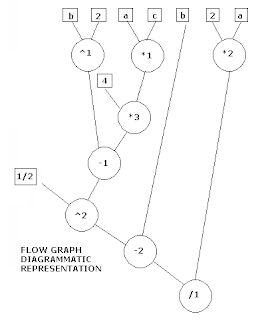
X = ((b2 -4ac) ½ -b )/ (2a)
Can be represented using functional notation
div(sub(pow(sub(pow(b,2),mul(4,mul(a,c))), ½),b), mul(2,a))
The flow graph diagrammatic representation is given below.
Cyclomatic Complexity
• It gives a quantitative measure of the logical complexity.
• On obtaining this value, it is found to give the number of independent paths in the basis set, and an upper bound for the number of tests to ensure that each statement is executed at least once.
• Cyclomatic complexity essentially represents the number of paths through a particular section of code, which in object-oriented languages applies to methods.
• Cyclomatic complexity's formal academic equation from graph theory is as follows:
CC = E -N+ P
where E represents the number of edges on a graph, N the number of nodes, and P the number of connected components
public int getValue(int param1)
{
int value = 0;
if (param1 == 0)
{
value = 4;
}
else
{
value = 0;
}
return value;
}
# Note that there are two decision points:
an if and an else. (which accounts for 2 CC)
In addition the method's entry point automatically adds one, the final value equals 3.
Hence Cyclomatic Complexity is 3
Cyclomatic Complexity (Ignored facts)
• As the cyclomatic complexity of a method is fundamentally the number of paths contained in that method, a general rule of thumb states that in order to ensure a high level of test coverage, the number of test cases for a method should equal the method's cyclomatic complexity. Unfortunately, this bold statement
often is ignored.
Control Structure Testing
# Can be achieved by
• Conditions Testing
• Data Flow Testing
• Loop Testing
Conditions Testing
• Condition Testing aims to exercise all logical conditions in a program.
• The Conditions to be tested may be
- Relational Expressions (a operand b), where a and b are arithmetic expressions,
- Simple condition (Boolean variable or relational expression)
- Compound condition: made up of two or more simple conditions, boolean operators
Data Flow testing
• Data Flow testing is done based on the selection of test paths according to the
location of definitiions and use of variables.
Loop Testing
• Loop structures are fundamental to many algorithms.
• Loops can be defined as Simple, Concatenated, Nested, and unstructured.
Important tip for Loop testing
• Note that unstructured loops are not to be tested.
• They need to be RE-DESIGNED for better performance.
TEST AREAS
Unit Testing
• During the course of testing, We find that various constituents of the system are tested in increasing degrees of granularity. i.e. We test from a component (smallest) to the full system.
• A Component is the smallest unit for testing.
Component
• A Component is an independent, isolated and reusable unit of a program that performs a well-defined function.
• Most components have public interfaces that allow it to be used to perform its functions.
Module
• A module comprises of one or more components to achieve the business function.
• The module encapsulates the functionality of its components and appears as a “Black Box” to its users.
Sub-System
• Sub-Systems are defined as heterogeneous collections of modules to achieve a business function.
Eg. A banking application might interface to a signature reader, Accounting mechanism, and a database component to perform banking related operations.
System
• The full system uses multiple subsystems to implement the full functionality of the Application.
Functional Test areas
• Security
• Network resources
• Capacity
• Scalability
• Reliability
• Burn-in
• Clustering
Security
• To address Security issues, following aspects are tested.
• Authentication (The authentication mechanism is tested based on class of user and password validation)
• If third party products such as LDAP servers are used, those are tested as well.
• LDAP, Lightweight Directory Access Protocol, is an Internet protocol that email and other programs use to look up information from a server
Data Security
• Flow of information as well as firewall access issues are tested for all aspects of the system under test.
• If data encryption is being used, it is tested for compatibility with standards.
Network Resources
• The factors to be tested as regards Network resources are
• Bandwidth
• Application dependency
Bandwidth
• System behavior is tracked by varying the bandwidth available on the network from
1Kbps to 10Mbps.
• Parameters such as timeouts and breakdowns of operations are monitored.
Applications dependency
• If the System under test has dependencies on network applications like SNMP, these are tested
• SNMP are tested for failover and recovery.
• SNMP (Simple Network Management Protocol)
SNMP
• It is an application layer protocol that facilitates the exchange of management
information between network devices.
• It is part of the Transmission Control Protocol/Internet Protocol (TCP/IP) protocol
suite.
• SNMP enables network administrators to manage network performance, find and solve
network problems, and plan for network growth.
Capacity
• Capacity testing looks at resource demands for each of the test vectors in various parts of the system.
• The test vectors are designed to reflect normal usage in terms of workflows and
bandwidth requirements.
Capacity test
• The basis for a capacity test is a thorn for most organizations, because they lack test requirements.
• Factors that affect the applications capacity in terms of response time and performance are
- Inefficient SQL statements
- Hardware equipment
- LAN/ WAN
- S/W version
• Underlying database system and database design
• Customization carried out for the Application
• Adding end-users from a previous release in a
production environment
Scalability
• This aspect of testing recognizes the potential for increases in scalability from a
system architecture, design, development, and deployment viewpoint.
• The application should be tested for the ability to scale linearly by the balanced
addition of computing (N/w, CPU, Memory, Disk etc) resulting in a proportionate increase in capacity at the same performance level.
Reliability
• The purpose of this test is to ensure that the Application under test performs in a
consistent manner.
Burn-in
• In this testing, the system or subsystem under test is run at full and partial loads over an extended period of timeto test for consistency.
Clustering
• For systems, that use clustering support, one or more systems are removed from the
installation on an operational system to check for system recovery, and verify fail over to the backup system.
• The application is tested for damage or compromise of data.
Test Case Designing
Test Case Design
# The design of tests is based on the following
• Test Strategy
• Test Planning
• Test Specification
• Test Procedure
Designing Unit Test cases
# To ensure that Unit testing is done correctly, ensure the following steps
• Step 1 : Make it run
• Step 2 : Positive Testing
• Step 3 : Negative Testing
• Step 4 : Special considerations
• Step 5 : Coverage Tests
• Step 6 : Coverage Completion
# Step 1 : Make it run
• The purpose of the first test case in any unit test specification should be to execute the unit under test in the simplest way possible.
• Suitable techniques
• Specification derived tests
• Equivalence partitioning
# Step 2 : Positive Testing
• Test case should be designed to show that the unit under test does what it is supposed to do.
• Suitable techniques
• Specification derived tests
• Equivalence partitioning
• State-transition testing.(using Start, input, output, finish)
# Step 3 : Negative Testing
• Existing test cases should be enhanced and further test cases should be designed to
show that the software does not do anything that it is not specified to do so.
• This will mean incorporating Negative Testing to ensure the same.
• Suitable techniques
• Error guessing
• Boundary value analysis
• Internal boundary value testing
• State-transition testing
# Step 4: Special Considerations
• Test cases should be designed to address issues such as performance, safety
requirements and security requirements.
• Particularly in the cases of safety and security, it should be possible to give test cases special emphasis to facilitate security analysis or safety analysis and certification.
• Suitable techniques
• Specification derived tests
# Step 5 : Coverage Tests
• The test coverage likely to be achieved by the designed test cases should be visualized.
• If found wanting, further test cases can be added to achieve specific test coverage
objectives.
• Suitable techniques
• Branch testing
• Condition testing
• Data definition-use testing
• State transition testing
# Step 6 : Coverage Completion
• This step takes into consideration the organization standards for the specification of a unit.
• There are likely to have human errors made in the development of a test specification.
• There may be complex decision conditions, loops, branches within the code for which
coverage targets may not have been met on test execution.
# Step 6 : Coverage Completion
• When coverage objectives are not achieved, analysis must be conducted to determine,
Why?
Reasons (Coverage Completion)
• A coverage objective may not be achieved due to
• Infeasible paths or conditions : Provide justification why the path or condition was not tested.
• Unreachable or redundant code : correct the code by deleting the offending part of the code.
• Insufficient test cases : test cases should be refined and further test cases added.
Coverage Completion
• Suitable techniques
• Branch testing
• Condition testing
• Data definition use testing
• State transition testing
Test Case Design Techniques
• The techniques for designing test cases can be clubbed into two broad categories.
• Black box techniques
• White Box techniques

Thank you for your wonderful
patience
Part I
Types of Testing
# Two types of Testing
• White Box Testing
• Black Box Testing
# Black Box Testing
• Basically used and implemented to test for the functionality of a module/ program/
application, with no knowledge of internal design of the product/ application.
• Tests are primarily based on requirements and functionality.
# White Box testing
• Also called Glass Box, structural, Clear box or Open box testing,
• In white box testing, the internal logic is given due importance,
• Tests are based on coverage of code statements, branches, and conditions,
Black Box testing
# Advantages
• Efficient when used on larger systems,
• Tester and Developer work independently, hence test is balanced and unprejudiced,
• Testing and Tester can be non-technical,
• Tests are conducted from the end-users viewpoint,
• Identifies the vagueness and contradiction in functional aspects,
• Test cases can be designed as soon as functional specifications are complete.
Black Box Testing
# Disadvantages
• Test cases are tough and challenging to design, without having clear functional specifications,
• It is difficult to identify tricky inputs, if the test cases are not developed from functional specifications,
• Limited testing time, hence difficult to identify all possible inputs,
• Chances of having unidentified paths during testing.
White Box testing
# Advantages
• Test is accurate since the tester knows what individual programs are supposed to do,
• Deviation from the intended goals as regards the functioning of the program can be checked and verified accurately.
# Disadvantage
• Requires thorough knowledge of the programming code to examine the related inputs and outputs.

White Box Testing (Pre-requisites)
• The key to undertake any White box testing is to understand the System architecture.
• The System Architecture documents should form the basis for identification of Systems, Sub-systems and generation of test cases.
Identification of Test Items
• The Identification of Test Items should be done based on the specifications of the
product/ application
Specifications required
• The specifications required for identification of test items are
• Functions of the system (List of functions)
• Response criteria (bench marking and stress testing)
• Volume constraints (number of users, hits, stress testing)
• Database responses (flushing, cleaning, update rates)
• Network Criteria (network traffic, choking)
• Compatibility (environments, browsers)
• User Interface / Friendliness
• Modularity (ability to easily interface with other tools)
• Security
Criteria for Test Cases
# Each test case document/ item should have the following features
• It should be uniquely identifiable
• It should be unambiguous
• It should have well-defined test data or data patterns
• It should have well defined PASS/ FAIL criteria for each sub-item and Overall criteria for PASS/ FAIL of the entire test.
• It should be easy to record
• It should be easy to demonstrate repeatedly
What White Box testing contains?
• White Box testing basically strives to attain Code coverage.
• How can we obtain and achieve good code coverage?
Basic Path Testing
• It is a mechanism to derive a logical complexity measure of a procedural design
and use this as a guide for defining a basic set of execution paths.
• With these test cases, we can ensure that the BASIC SET will execute every statement at least once.
Flow Graph Notation
• A notation for representing control flow similar to flow charts.
Example (Flow graph notation)
# Eg.
X = ((b2 -4ac) ½ -b )/ (2a)
Can be represented using functional notation
div(sub(pow(sub(pow(b,2),mul(4,mul(a,c))), ½),b), mul(2,a))
The flow graph diagrammatic representation is given below.

Cyclomatic Complexity
• It gives a quantitative measure of the logical complexity.
• On obtaining this value, it is found to give the number of independent paths in the basis set, and an upper bound for the number of tests to ensure that each statement is executed at least once.
• Cyclomatic complexity essentially represents the number of paths through a particular section of code, which in object-oriented languages applies to methods.
• Cyclomatic complexity's formal academic equation from graph theory is as follows:
CC = E -N+ P
where E represents the number of edges on a graph, N the number of nodes, and P the number of connected components
public int getValue(int param1)
{
int value = 0;
if (param1 == 0)
{
value = 4;
}
else
{
value = 0;
}
return value;
}
# Note that there are two decision points:
an if and an else. (which accounts for 2 CC)
In addition the method's entry point automatically adds one, the final value equals 3.
Hence Cyclomatic Complexity is 3
Cyclomatic Complexity (Ignored facts)
• As the cyclomatic complexity of a method is fundamentally the number of paths contained in that method, a general rule of thumb states that in order to ensure a high level of test coverage, the number of test cases for a method should equal the method's cyclomatic complexity. Unfortunately, this bold statement
often is ignored.
Control Structure Testing
# Can be achieved by
• Conditions Testing
• Data Flow Testing
• Loop Testing
Conditions Testing
• Condition Testing aims to exercise all logical conditions in a program.
• The Conditions to be tested may be
- Relational Expressions (a operand b), where a and b are arithmetic expressions,
- Simple condition (Boolean variable or relational expression)
- Compound condition: made up of two or more simple conditions, boolean operators
Data Flow testing
• Data Flow testing is done based on the selection of test paths according to the
location of definitiions and use of variables.
Loop Testing
• Loop structures are fundamental to many algorithms.
• Loops can be defined as Simple, Concatenated, Nested, and unstructured.
Important tip for Loop testing
• Note that unstructured loops are not to be tested.
• They need to be RE-DESIGNED for better performance.
TEST AREAS
Unit Testing
• During the course of testing, We find that various constituents of the system are tested in increasing degrees of granularity. i.e. We test from a component (smallest) to the full system.
• A Component is the smallest unit for testing.
Component
• A Component is an independent, isolated and reusable unit of a program that performs a well-defined function.
• Most components have public interfaces that allow it to be used to perform its functions.
Module
• A module comprises of one or more components to achieve the business function.
• The module encapsulates the functionality of its components and appears as a “Black Box” to its users.
Sub-System
• Sub-Systems are defined as heterogeneous collections of modules to achieve a business function.
Eg. A banking application might interface to a signature reader, Accounting mechanism, and a database component to perform banking related operations.
System
• The full system uses multiple subsystems to implement the full functionality of the Application.
Functional Test areas
• Security
• Network resources
• Capacity
• Scalability
• Reliability
• Burn-in
• Clustering
Security
• To address Security issues, following aspects are tested.
• Authentication (The authentication mechanism is tested based on class of user and password validation)
• If third party products such as LDAP servers are used, those are tested as well.
• LDAP, Lightweight Directory Access Protocol, is an Internet protocol that email and other programs use to look up information from a server
Data Security
• Flow of information as well as firewall access issues are tested for all aspects of the system under test.
• If data encryption is being used, it is tested for compatibility with standards.
Network Resources
• The factors to be tested as regards Network resources are
• Bandwidth
• Application dependency
Bandwidth
• System behavior is tracked by varying the bandwidth available on the network from
1Kbps to 10Mbps.
• Parameters such as timeouts and breakdowns of operations are monitored.
Applications dependency
• If the System under test has dependencies on network applications like SNMP, these are tested
• SNMP are tested for failover and recovery.
• SNMP (Simple Network Management Protocol)
SNMP
• It is an application layer protocol that facilitates the exchange of management
information between network devices.
• It is part of the Transmission Control Protocol/Internet Protocol (TCP/IP) protocol
suite.
• SNMP enables network administrators to manage network performance, find and solve
network problems, and plan for network growth.
Capacity
• Capacity testing looks at resource demands for each of the test vectors in various parts of the system.
• The test vectors are designed to reflect normal usage in terms of workflows and
bandwidth requirements.
Capacity test
• The basis for a capacity test is a thorn for most organizations, because they lack test requirements.
• Factors that affect the applications capacity in terms of response time and performance are
- Inefficient SQL statements
- Hardware equipment
- LAN/ WAN
- S/W version
• Underlying database system and database design
• Customization carried out for the Application
• Adding end-users from a previous release in a
production environment
Scalability
• This aspect of testing recognizes the potential for increases in scalability from a
system architecture, design, development, and deployment viewpoint.
• The application should be tested for the ability to scale linearly by the balanced
addition of computing (N/w, CPU, Memory, Disk etc) resulting in a proportionate increase in capacity at the same performance level.
Reliability
• The purpose of this test is to ensure that the Application under test performs in a
consistent manner.
Burn-in
• In this testing, the system or subsystem under test is run at full and partial loads over an extended period of timeto test for consistency.
Clustering
• For systems, that use clustering support, one or more systems are removed from the
installation on an operational system to check for system recovery, and verify fail over to the backup system.
• The application is tested for damage or compromise of data.
Test Case Designing
Test Case Design
# The design of tests is based on the following
• Test Strategy
• Test Planning
• Test Specification
• Test Procedure
Designing Unit Test cases
# To ensure that Unit testing is done correctly, ensure the following steps
• Step 1 : Make it run
• Step 2 : Positive Testing
• Step 3 : Negative Testing
• Step 4 : Special considerations
• Step 5 : Coverage Tests
• Step 6 : Coverage Completion
# Step 1 : Make it run
• The purpose of the first test case in any unit test specification should be to execute the unit under test in the simplest way possible.
• Suitable techniques
• Specification derived tests
• Equivalence partitioning
# Step 2 : Positive Testing
• Test case should be designed to show that the unit under test does what it is supposed to do.
• Suitable techniques
• Specification derived tests
• Equivalence partitioning
• State-transition testing.(using Start, input, output, finish)
# Step 3 : Negative Testing
• Existing test cases should be enhanced and further test cases should be designed to
show that the software does not do anything that it is not specified to do so.
• This will mean incorporating Negative Testing to ensure the same.
• Suitable techniques
• Error guessing
• Boundary value analysis
• Internal boundary value testing
• State-transition testing
# Step 4: Special Considerations
• Test cases should be designed to address issues such as performance, safety
requirements and security requirements.
• Particularly in the cases of safety and security, it should be possible to give test cases special emphasis to facilitate security analysis or safety analysis and certification.
• Suitable techniques
• Specification derived tests
# Step 5 : Coverage Tests
• The test coverage likely to be achieved by the designed test cases should be visualized.
• If found wanting, further test cases can be added to achieve specific test coverage
objectives.
• Suitable techniques
• Branch testing
• Condition testing
• Data definition-use testing
• State transition testing
# Step 6 : Coverage Completion
• This step takes into consideration the organization standards for the specification of a unit.
• There are likely to have human errors made in the development of a test specification.
• There may be complex decision conditions, loops, branches within the code for which
coverage targets may not have been met on test execution.
# Step 6 : Coverage Completion
• When coverage objectives are not achieved, analysis must be conducted to determine,
Why?
Reasons (Coverage Completion)
• A coverage objective may not be achieved due to
• Infeasible paths or conditions : Provide justification why the path or condition was not tested.
• Unreachable or redundant code : correct the code by deleting the offending part of the code.
• Insufficient test cases : test cases should be refined and further test cases added.
Coverage Completion
• Suitable techniques
• Branch testing
• Condition testing
• Data definition use testing
• State transition testing
Test Case Design Techniques
• The techniques for designing test cases can be clubbed into two broad categories.
• Black box techniques
• White Box techniques

Thank you for your wonderful
patience
Wednesday, October 15, 2008
Software Testing - Validation
Features of Testing
- Testing is a planned activity
- Expected output has to be defined
- Peers within and outside the project group can do testing
- Test results undergo final inspection before delivery
- Test cases are written for both valid and invalid conditions
- Testability is one of the key features in the software design
- Testing is an extremely creative and intellectually challenging task
- A good test case is one that has a high probability of detecting an as-yet-undiscovered error
- A successful test case is one that detects an as-yet-undiscovered error.
Testing (Definition)
“TESING IS THE PROCESS OF EXECUTING A PROGRAM WITH THE INTENT OF FINDING ERRORS"
Testing Strategy
- Every project should develop a testing strategy in the initial stages and include it as a part of the software management plan.
- The testing strategy includes the following
- The stage at which testing activity will start,
- Types of testing,
- Risks associated with testing,
- Critical success factors,
Testing Strategy
- Testing objectives,
- Composition of the Test Team,
- Test completion criteria,
- Test stop criteria,
- Test tools to be used.
Types of Testing
- Unit testing,
- Integration Testing,
- Functional testing,
- System testing,
- Regression test,
- Acceptance test etc.
Risks associated with testing
- Some typical risks are
- Development team new to the environment and technology,
- No automated tools identified,
- May not work under a specified environment.
Critical Success Factors
- Delivery on time,
- Reasonable response time,
- Understanding the business context and project objectives.
Testing objectives
- To ensure user-friendliness,
- To ensure a good response time,
- To ensure reliability and usability
- To ensure that software is free from major defects.
Test Completion Criteria
- Identifies the point at which the testing activity gets completed successfully.
- Guidelines at arriving at test completion criteria
- When all test cases are executed without producing any errors
- Complete the testing activity when N number of errors have been found and corrected
- Testing gets completed when all the branches and statements are executed,
Test Stop Criteria
- If the number of errors exceed the acceptable limit then the testing activity should be abandoned. This limit is set at the beginning of the project.
Testing Levels
- Testing in general can be categorized into
- Black Box Testing, and
- White Box Testing.
Black Box Testing
- In Black Box Testing, the product is considered like a black box where the tester is not aware of the intricacies and only validates that the box functions properly as a whole,
- Technically speaking, it is not based on any knowledge of internal design of the product,
- Tests are based on requirements and functionality.
White Box Testing
- Also called Glass Box, structural, Clear box or Open box testing,
- In white box testing, the internal logic is given due importance,
- Tests are based on coverage of code statements, branches, and conditions,
- At the micro level, classified into statement coverage, branch coverage and condition coverage tests.
Black Box Testing
Advantages
- Efficient when used on larger systems,
- Tester and Developer work independently, hence test is balanced and unprejudiced,
- Testing and Tester can be non-technical,
- Tests are conducted from the end-users viewpoint,
- Identifies the vagueness and contradiction in functional aspects,
- Test cases can be designed as soon as functional specifications are complete.
Black Box Testing
Disadvantages
- Test cases are tough and challenging to design, without having clear functional specifications,
- It is difficult to identify tricky inputs, if the test cases are not developed from functional specifications,
- Limited testing time, hence difficult to identify all possible inputs,
- Chances of having unidentified paths during testing.
White Box Testing
- Advantages
- Test is accurate since the tester knows what individual programs are supposed to do,
- Deviation from the intended goals as regards the functioning of the program can be checked and verified accurately.
- Disadvantage
- Requires thorough knowledge of the programming code to examine the related inputs and outputs.
Types of Testing
Unit Testing
- It is the first level of Dynamic testing,
- Is the primary responsibility of the developers,
- Unit testing is performed after the expected test results are met or deviations/ differences are explainable and acceptable.
Functional Testing
- Black box testing used to test only functional requirements of an application,
- Performed by Tester(s).
Black Box Functional test techniques
- Functional Black Box test can be done by using the following techniques.
- Equivalence Class partitioning (EC), and
- Boundary Value Analysis (BAV)
Equivalence Class Partitioning
- In this technique, we divide the testing into equal valid and invalid classes.
- The valid classes check for correct data inputs and the invalid classes check for incorrect data inputs.
- The system should respond well to both valid and invalid classes.
Eg.
- In the example for marks assigned to a subject for a student;
- The valid classes is the range 0 – 100
- The Invalid classes are <> 100.
- When the user considers one input data from each class, the user will be able to test the complete functionality for the marks.
Boundary Value Analysis (BAV)
- In this technique, the tester is more concerned with testing at the boundaries of the classes.
- The probability of finding defects at the boundary of the classes are higher.
Boundary Value Analysis (BAV)
Eg.
- In the example for Marks, we could test at 0.2, -0.2, 99.89 and 100.03.
- In case of component testing, we have to partition the input and output values of the component into a number of ordered sets within identifiable boundaries.
- The values have to selected in such a way that if the system works correctly for these values, it will definitely work correctly for the values in the related range.
Integration Testing
- Upon completion of successful Unit testing, Integration testing is done,
- To ensure that distinct components of the application still work in accordance to client’s requirements,
- Test sets will be developed with the view to test the interfaces between the components.
Incremental Integration Testing
- To test various aspects of the application’s functionality be independent enough to work separately before all parts of the application are completed,
- Test stubs and Test drivers are needed to test individual components.
- Test Stub : A work code may call a simulated code called test stub, instead of the actual routine.
- Test Driver : A simulated code used to call a routine.
System Testing
- Testing done after Integration Testing,
- The complete system is configured and tested in a controlled environment to validate its accuracy and completeness in performing the desired functions,
- Testing team is responsible for System test,
- Prior to System test, the results of Unit and Integration test will be reviewed by SQA to ensure that all problem areas are resolved.
End-to-End Testing
- Similar to System Testing, but done at the “macro” level,
- The basic functionality is checked for in this testing (eg: interacting with database, network communication, interaction with other applications or network etc).
Regression Testing
- Testing done to check the impact on account of resolution of defects found in a previous version of the application,
- It is done to ensure that software remains intact on account of changes done,
Sanity Testing
- Testing performed whenever cursory testing is sufficient to prove the application is functioning according to specifications,
- Include a set of core tests of basic GUI functionality to demonstrate connectivity to database, application servers, printers etc.
Performance Testing
- Part of System testing, but treated as a different test,
- Will verify the load, volume and response times as defined by requirements.
Load testing
- Testing the application under heavy loads,
- Example of Load testing is testing of a web site under a range of loads (connected users) to determine at what point the systems response time deteriorates or fails.
Installation Testing
- Testing Full, Partial or Upgrade install/ uninstall process,
- Is conducted with the objective of demonstrating production readiness,
- The test is conducted after the application has been migrated to the client’s site,
- When necessary, a sanity will be performed after the Installation testing.
Security / Penetration Testing
- Testing how well the system protects against unauthorized access (internal or external),
- Requires sophisticated testing techniques.
Recovery/ Error Testing
- Testing how well a system recovers from crashes, hardware failures, or other catastrophic problems.
Compatibility testing
- Testing how well a systems performs in a particular hardware/ software/ Operating system/ network environment.
Comparison Testing
- Testing done to compare software strengths and weaknesses to other competing software products.
Acceptance Testing
- Gives the client the opportunity to verify the system functionality and usability prior to the system being moved to production,
- Responsibility of the Client with support from the Project Team,
- The Client and the Project Team will together prepare the acceptance criteria.
Parallel/ Audit Testing
- Testing where the user reconciles the output of the current system to verify the new system performs as per the old existing system.
Alpha Testing
- Testing of an application when nearing completion,
- Done by end-users or others, and not by programmers or testers,
- Done in a controlled environment at the development site.
Beta Testing
- Testing done to check for bugs and problems before the final release,
- Done by the end-users or others, and not by programmers or testers,
- Done at the client site.
Testing Team
- A testing team should comprise of the following
Test/ QA Team Lead
- Coordinates the testing activity,
- Communicates testing status to management,
- Manages the team.
Testers
- Develop test scripts, test case and test data,
- Execute test scripts,
- Evaluates results for different types of testing (System, integration and regression).
Test Build Manager/ System Administrator/ Database Manager
- Delivers current version of the software to the testing team for testing,
- Performs installation of application software and apply patches if required,
- Performs set-up, maintenance, back-up of test environment.
Technical Analyst/ Test Configuration Manager
- Performs testing assessment and validates system/ functional test requirements,
- Maintains the test environment, test scripts, software and test data.
Testing Methodology
Step 1 – Create Test Strategy
Inputs required
- Test Environment (Hardware and Software components), Test tool data,
- Description of roles and responsibilities of resources, and schedule constraints,
- Standards used,
- Functional and Technical requirements for the application,
- Description about System limitations.
Outputs
- Approved and signed off test strategy document, test plan and test cases,
- Testing issues requiring resolution (with co-operation from project management).
Step 2 – Create Test plan/ design
Inputs
- Approved Test Strategy document,
- Automated testware, test tools (if required),
- Documents for understanding software complexity (Software Design, Code)
Output
- Design problems, Code issues (feedback to developers)
- Approved test scenarios and scripts with test data.
Step 3 – Execute Tests
Inputs
- Approved test documents (Test plans, cases, procedures),
- Automated testware (if required),
- Change request (if any),
- Test data,
- Availability of Test and Project teams,
- General and Detailed design documents (Requirements, software design),
- Unit Tested code (from Configuration/ Build Manager),
- Test readiness document,
- Update documents (if any).
Outputs
- Test fixes (changes to the code),
- Test document problems,
- Documented problems with requirements, design, and Code issues,
- Problem tracking document,
- Tested Source and Object code (baselined and versioned),
- Test Report,
- Testing deliverables (approved and signed-off)
Test Plan
- It is a document that describes the objectives, scope, approach, and focus of a software testing effort.
- The process of preparing a test plan is a useful way to think through the efforts needed to validate the acceptability of the software product.
- It will help people outside the Test Group to understand the “WHY” and “HOW” of product validation.
Test Plan (Outline)
- Introduction
- Purpose
- Abbreviations
- Definitions
- Scope
- References
- Testing Process
- Test Objective
- Test Strategy
- Test Methodology used
- Test Environment
- Test team and their composition
- Risks associated with the testing
- Test Scripts and Test Cases
- Software Quality Assurance Plan
- Organization Elements Involved
- Involved Organizational Elements, Tasks & Responsibilities
- QA Audits
- Managerial reviews
- Matrices Required and formats.
Test Scripts
- A series of instructions written to test a particular component, software or a part of the software.
- The test scripts is comprised of number of test cases, designed to test the work product in every possible way, to eliminate the occurrence of defects/ deviations.
Preparing Test Script
- Note the steps below to prepare an effective test script.
- Decide which are your key functional areas to test,
- Devise test scripts to test this functional area from Start to Finish,
Practicalities in implementingTest Scripts
- Some work still remains after the agenda and preparation of scripts
- The scripts must be organized into a time bound schedule,
- Have a follow-up session at the start and at the end to pick up issues from the previous sessions.
- A facilitator needs to check with the team that a test case (point) has been adequately covered before proceeding.
Testing Re-visited and Highlighted
Essentials of Testing Process
- The quality of the testing process determines the success of the test effort,
- Prevent defect migration by using early lifecycle testing techniques,
- A person must take responsibility for improving the testing process,
- Cultivate a positive team attitude of creative destruction.
Attitude of Testers
- Testers hunt errors
- The focus on showing the presence of errors is the basic attitude of a good tester. It should give personal satisfaction to the team member(s) to find errors.
- Testers are creative destructors
- It takes imagination, persistence and patience to systematically locate the weaknesses in a complex structure and demonstrate its failures.
- Testers pursue errors, not people
- Errors are in the work product and not in the person who made the mistake. The errors are in the process that goes into producing the work product.
- Testers add value to the product
- They improve the overall quality of the product.
How to do testing?
- By examining the internal structure and design
- By examining the functional user interface
- By examining the design objectives
- By examining the user requirements
- By executing the Code
Testing Maturity Model (TMM)
- TMM is a set of levels the defines a testing maturity hierarchy.
- Each level represents a stage in the evaluation to a mature testing process,
- Graduating to an upper level implies that the lower level practices continue to be in place.
- Organizations will strive toward testing maturity by focusing on the goals defined for each level.
- TMM is designed to help software quality related activities.
- TMM maturity criteria will have a highly positive impact on software quality, software engineering productivity, and cycle time reduction efforts,
Why TMM is required?
- Testing is a critical component of a mature software development process,
- It is one of the most challenging and costly process activities, and contributes significantly towards the overall software quality,
- In spite of its importance, it has not been address by existing maturity models
- The TMM addresses issues important to test managers, test specialists and software quality assurance staff.
- The issues not address by existing maturity models
- Concept of testing maturity is not addressed,
- No adequate inclusion of testing practices as a process improvement mechanism,
- Quality related issues such as testability, test criteria, test planning and software certifications are not satisfactorily addressed.
Who uses TMM?
- Used by Internal assessment team to identify the current testing Capability State,
- By Upper management to initiate a testing improvement program,
- Development teams to improve testing capability,
- Users and clients to define their role in the testing process.
Levels of TMM
- Level 1: Initial
- Level 2:Phase definition
- Institutionalize basic testing,
- Initiate a test planning process,
- Develop testing and debugging goals.
Levels of TMM
- Level 3: Integration
- Control and monitor the test process,
- Integrate testing into the software lifecycle,
- Establish a technical training program,
- Establish a software test organization
Levels of TMM
- Level 4: Management and Measurement
- Software quality evaluation,
- Establish a test measurement program,
- Establish an organization-wide review program
Levels of TMM
- Level 5: Optimization, Defect Prevention and Quality Control
- Test process optimization,
- Quality control,
- Application of process data for defect prevention.
Testing Metrics
- A quantitative measure of the degree to which a system, component or process possesses a given attribute.
- Used to quantity the software, software development resource and the development process.
Test Metrics
- User participation (to find the involvement of the testers)
User Participation = User participation test time v/s Total test time.
Test Metrics
- Path tested (Extend of testing)
Number of path tested
= ----------------------------
Total number of paths
Test Metrics
- Acceptance Criteria tested (extent of testing)
= Acceptance Criteria verified v/s Total Acceptance Criteria.
Test Metrics
- Test Cost (Resources consumed in testing)
= Test Cost v/s Total system cost
Test Metrics
- Cost to Locate Defect (resources consumed in testing)
Test Cost
= ---------------------------------------------------
No. of defects located in the Testing.
Test Metrics
- Detected Production defect (Effectiveness of testing)
No. of defects detected in Production
= -----------------------------------------------------
Application System size.
Test Metrics
- Test Automation (Effectiveness of automated testing)
Cost of Automated Test Effort
= ----------------------------------
Total test cost
Test Reports
Functional Testing Status
- Will show percentages of the functions which have been
- Fully tested,
- Tested with Open defects,
- Not tested
- Expected verses Actual Defects detected
- Will provide an analysis between the number of defects being generated against the expected number of defects
Defects detected verses Corrected Gap
- Will show the number of defects uncovered verses the number of defects being corrected and accepted by the development team.
Defect Distribution
- Will show the defect distribution by function or module.
- Testing Action
- Show many different aspects of the testing. Examples are a) number of Severity defects b) tests behind schedule, and any other reports that would present an accurate picture.
Web Testing
- Web testing is divided into 6 categories
- User interface,
- Functionality,
- Interface testing,
- Compatibility
- Load/ Stress, and
- Security
User Interface
- The web browser page should be user friendly,
- Navigation should be properly addressed and be easy,
- Instructions in the web page should be self explanatory,
- The site should have a navigational bar (site map),
- Content should be aligned, with proper layout. Exact wording should be available. Content to be designed professionally.
- Color / Backgrounds – Right color and backgrounds towards a neat web page,
- Images – using image that are fast loading, and suits the bandwidth.
- Tables if used, are setup properly. Having the table within the page, Columns wide enough, wrap around rows.
- Wrap around – wrap around of text around the images and the text should properly indicated the image.
Functionality
- Links – verify that the link is directing you to the requested page, and the existence of the page.
- Forms – information submitted thru a form should work properly and the system is able to use this information
- Data verification – Verify the user input according to business rules i.e invalid values should be rejected.
- Cookies – Verify that the cookies are working.
- Application specific functional requirements – perform all functions that the business provides and check if they are working.
Interface testing
- Server interface – attempt transactions and view the server logs and verify that the information displayed on the browser is actually retrieved from the server.
- External interfaces – verify the external interfaces like credit card transactions bcoz they deal with an external server.
- Error handling – Verify that the system can handle all the errors. Eg . Disconnect user from the server and check whether the credit card info is added and saved.
Compatibility
- Verify that the application works on the machine that the users will be using,
- Try every operating system, browser, video settings, and modem speed.
- Operating system (win 95, 98, NT, 2K, XP), Browsers (IE, Netscape, Opera etc), Video Settings (640x400, 600x800 etc ), modem connection (dialup, DSL etc)
Load/ Stress
- Verify that the system can handle a large number of users simultaneously, (with large data from each user)
- Eg: Many users at same time, Large amount of data from each user, Long period of continuous use etc.
Security
- Susceptibility to hacking
- Proper setup of directories. (each directory should have an index.html or main.html so that a directory listing does not appear).
- Valid logins – system does not allow invalid logins, maximum number of failed logins before being locked out etc.
- Log files – verify that server logs are working properly. Does log track every transaction? (unsuccessful login attempts, IP address, username), what does the log store?
Unit Test checklist template
1) Project Name :
2) Release Date :
3) Peer Review Date :
4) Checklist users name/ Role:
5) Work product Author / Dept:
6) State of Product : Draft/ Intermediate/ Final:
7) Type of review : Meeting/ Coordination
8) Location of work product:
9) Supporting material and location:
10) Time duration:
11) Checklist given below
- Testing is a planned activity
- Expected output has to be defined
- Peers within and outside the project group can do testing
- Test results undergo final inspection before delivery
- Test cases are written for both valid and invalid conditions
- Testability is one of the key features in the software design
- Testing is an extremely creative and intellectually challenging task
- A good test case is one that has a high probability of detecting an as-yet-undiscovered error
- A successful test case is one that detects an as-yet-undiscovered error.
Testing (Definition)
“TESING IS THE PROCESS OF EXECUTING A PROGRAM WITH THE INTENT OF FINDING ERRORS"
Testing Strategy
- Every project should develop a testing strategy in the initial stages and include it as a part of the software management plan.
- The testing strategy includes the following
- The stage at which testing activity will start,
- Types of testing,
- Risks associated with testing,
- Critical success factors,
Testing Strategy
- Testing objectives,
- Composition of the Test Team,
- Test completion criteria,
- Test stop criteria,
- Test tools to be used.
Types of Testing
- Unit testing,
- Integration Testing,
- Functional testing,
- System testing,
- Regression test,
- Acceptance test etc.
Risks associated with testing
- Some typical risks are
- Development team new to the environment and technology,
- No automated tools identified,
- May not work under a specified environment.
Critical Success Factors
- Delivery on time,
- Reasonable response time,
- Understanding the business context and project objectives.
Testing objectives
- To ensure user-friendliness,
- To ensure a good response time,
- To ensure reliability and usability
- To ensure that software is free from major defects.
Test Completion Criteria
- Identifies the point at which the testing activity gets completed successfully.
- Guidelines at arriving at test completion criteria
- When all test cases are executed without producing any errors
- Complete the testing activity when N number of errors have been found and corrected
- Testing gets completed when all the branches and statements are executed,
Test Stop Criteria
- If the number of errors exceed the acceptable limit then the testing activity should be abandoned. This limit is set at the beginning of the project.
Testing Levels
- Testing in general can be categorized into
- Black Box Testing, and
- White Box Testing.
Black Box Testing
- In Black Box Testing, the product is considered like a black box where the tester is not aware of the intricacies and only validates that the box functions properly as a whole,
- Technically speaking, it is not based on any knowledge of internal design of the product,
- Tests are based on requirements and functionality.
White Box Testing
- Also called Glass Box, structural, Clear box or Open box testing,
- In white box testing, the internal logic is given due importance,
- Tests are based on coverage of code statements, branches, and conditions,
- At the micro level, classified into statement coverage, branch coverage and condition coverage tests.
Black Box Testing
Advantages
- Efficient when used on larger systems,
- Tester and Developer work independently, hence test is balanced and unprejudiced,
- Testing and Tester can be non-technical,
- Tests are conducted from the end-users viewpoint,
- Identifies the vagueness and contradiction in functional aspects,
- Test cases can be designed as soon as functional specifications are complete.
Black Box Testing
Disadvantages
- Test cases are tough and challenging to design, without having clear functional specifications,
- It is difficult to identify tricky inputs, if the test cases are not developed from functional specifications,
- Limited testing time, hence difficult to identify all possible inputs,
- Chances of having unidentified paths during testing.
White Box Testing
- Advantages
- Test is accurate since the tester knows what individual programs are supposed to do,
- Deviation from the intended goals as regards the functioning of the program can be checked and verified accurately.
- Disadvantage
- Requires thorough knowledge of the programming code to examine the related inputs and outputs.
Types of Testing
Unit Testing
- It is the first level of Dynamic testing,
- Is the primary responsibility of the developers,
- Unit testing is performed after the expected test results are met or deviations/ differences are explainable and acceptable.
Functional Testing
- Black box testing used to test only functional requirements of an application,
- Performed by Tester(s).
Black Box Functional test techniques
- Functional Black Box test can be done by using the following techniques.
- Equivalence Class partitioning (EC), and
- Boundary Value Analysis (BAV)
Equivalence Class Partitioning
- In this technique, we divide the testing into equal valid and invalid classes.
- The valid classes check for correct data inputs and the invalid classes check for incorrect data inputs.
- The system should respond well to both valid and invalid classes.
Eg.
- In the example for marks assigned to a subject for a student;
- The valid classes is the range 0 – 100
- The Invalid classes are <> 100.
- When the user considers one input data from each class, the user will be able to test the complete functionality for the marks.
Boundary Value Analysis (BAV)
- In this technique, the tester is more concerned with testing at the boundaries of the classes.
- The probability of finding defects at the boundary of the classes are higher.
Boundary Value Analysis (BAV)
Eg.
- In the example for Marks, we could test at 0.2, -0.2, 99.89 and 100.03.
- In case of component testing, we have to partition the input and output values of the component into a number of ordered sets within identifiable boundaries.
- The values have to selected in such a way that if the system works correctly for these values, it will definitely work correctly for the values in the related range.
Integration Testing
- Upon completion of successful Unit testing, Integration testing is done,
- To ensure that distinct components of the application still work in accordance to client’s requirements,
- Test sets will be developed with the view to test the interfaces between the components.
Incremental Integration Testing
- To test various aspects of the application’s functionality be independent enough to work separately before all parts of the application are completed,
- Test stubs and Test drivers are needed to test individual components.
- Test Stub : A work code may call a simulated code called test stub, instead of the actual routine.
- Test Driver : A simulated code used to call a routine.
System Testing
- Testing done after Integration Testing,
- The complete system is configured and tested in a controlled environment to validate its accuracy and completeness in performing the desired functions,
- Testing team is responsible for System test,
- Prior to System test, the results of Unit and Integration test will be reviewed by SQA to ensure that all problem areas are resolved.
End-to-End Testing
- Similar to System Testing, but done at the “macro” level,
- The basic functionality is checked for in this testing (eg: interacting with database, network communication, interaction with other applications or network etc).
Regression Testing
- Testing done to check the impact on account of resolution of defects found in a previous version of the application,
- It is done to ensure that software remains intact on account of changes done,
Sanity Testing
- Testing performed whenever cursory testing is sufficient to prove the application is functioning according to specifications,
- Include a set of core tests of basic GUI functionality to demonstrate connectivity to database, application servers, printers etc.
Performance Testing
- Part of System testing, but treated as a different test,
- Will verify the load, volume and response times as defined by requirements.
Load testing
- Testing the application under heavy loads,
- Example of Load testing is testing of a web site under a range of loads (connected users) to determine at what point the systems response time deteriorates or fails.
Installation Testing
- Testing Full, Partial or Upgrade install/ uninstall process,
- Is conducted with the objective of demonstrating production readiness,
- The test is conducted after the application has been migrated to the client’s site,
- When necessary, a sanity will be performed after the Installation testing.
Security / Penetration Testing
- Testing how well the system protects against unauthorized access (internal or external),
- Requires sophisticated testing techniques.
Recovery/ Error Testing
- Testing how well a system recovers from crashes, hardware failures, or other catastrophic problems.
Compatibility testing
- Testing how well a systems performs in a particular hardware/ software/ Operating system/ network environment.
Comparison Testing
- Testing done to compare software strengths and weaknesses to other competing software products.
Acceptance Testing
- Gives the client the opportunity to verify the system functionality and usability prior to the system being moved to production,
- Responsibility of the Client with support from the Project Team,
- The Client and the Project Team will together prepare the acceptance criteria.
Parallel/ Audit Testing
- Testing where the user reconciles the output of the current system to verify the new system performs as per the old existing system.
Alpha Testing
- Testing of an application when nearing completion,
- Done by end-users or others, and not by programmers or testers,
- Done in a controlled environment at the development site.
Beta Testing
- Testing done to check for bugs and problems before the final release,
- Done by the end-users or others, and not by programmers or testers,
- Done at the client site.
Testing Team
- A testing team should comprise of the following
Test/ QA Team Lead
- Coordinates the testing activity,
- Communicates testing status to management,
- Manages the team.
Testers
- Develop test scripts, test case and test data,
- Execute test scripts,
- Evaluates results for different types of testing (System, integration and regression).
Test Build Manager/ System Administrator/ Database Manager
- Delivers current version of the software to the testing team for testing,
- Performs installation of application software and apply patches if required,
- Performs set-up, maintenance, back-up of test environment.
Technical Analyst/ Test Configuration Manager
- Performs testing assessment and validates system/ functional test requirements,
- Maintains the test environment, test scripts, software and test data.
Testing Methodology
Step 1 – Create Test Strategy
Inputs required
- Test Environment (Hardware and Software components), Test tool data,
- Description of roles and responsibilities of resources, and schedule constraints,
- Standards used,
- Functional and Technical requirements for the application,
- Description about System limitations.
Outputs
- Approved and signed off test strategy document, test plan and test cases,
- Testing issues requiring resolution (with co-operation from project management).
Step 2 – Create Test plan/ design
Inputs
- Approved Test Strategy document,
- Automated testware, test tools (if required),
- Documents for understanding software complexity (Software Design, Code)
Output
- Design problems, Code issues (feedback to developers)
- Approved test scenarios and scripts with test data.
Step 3 – Execute Tests
Inputs
- Approved test documents (Test plans, cases, procedures),
- Automated testware (if required),
- Change request (if any),
- Test data,
- Availability of Test and Project teams,
- General and Detailed design documents (Requirements, software design),
- Unit Tested code (from Configuration/ Build Manager),
- Test readiness document,
- Update documents (if any).
Outputs
- Test fixes (changes to the code),
- Test document problems,
- Documented problems with requirements, design, and Code issues,
- Problem tracking document,
- Tested Source and Object code (baselined and versioned),
- Test Report,
- Testing deliverables (approved and signed-off)
Test Plan
- It is a document that describes the objectives, scope, approach, and focus of a software testing effort.
- The process of preparing a test plan is a useful way to think through the efforts needed to validate the acceptability of the software product.
- It will help people outside the Test Group to understand the “WHY” and “HOW” of product validation.
Test Plan (Outline)
- Introduction
- Purpose
- Abbreviations
- Definitions
- Scope
- References
- Testing Process
- Test Objective
- Test Strategy
- Test Methodology used
- Test Environment
- Test team and their composition
- Risks associated with the testing
- Test Scripts and Test Cases
- Software Quality Assurance Plan
- Organization Elements Involved
- Involved Organizational Elements, Tasks & Responsibilities
- QA Audits
- Managerial reviews
- Matrices Required and formats.
Test Scripts
- A series of instructions written to test a particular component, software or a part of the software.
- The test scripts is comprised of number of test cases, designed to test the work product in every possible way, to eliminate the occurrence of defects/ deviations.
Preparing Test Script
- Note the steps below to prepare an effective test script.
- Decide which are your key functional areas to test,
- Devise test scripts to test this functional area from Start to Finish,
Practicalities in implementingTest Scripts
- Some work still remains after the agenda and preparation of scripts
- The scripts must be organized into a time bound schedule,
- Have a follow-up session at the start and at the end to pick up issues from the previous sessions.
- A facilitator needs to check with the team that a test case (point) has been adequately covered before proceeding.
Testing Re-visited and Highlighted
Essentials of Testing Process
- The quality of the testing process determines the success of the test effort,
- Prevent defect migration by using early lifecycle testing techniques,
- A person must take responsibility for improving the testing process,
- Cultivate a positive team attitude of creative destruction.
Attitude of Testers
- Testers hunt errors
- The focus on showing the presence of errors is the basic attitude of a good tester. It should give personal satisfaction to the team member(s) to find errors.
- Testers are creative destructors
- It takes imagination, persistence and patience to systematically locate the weaknesses in a complex structure and demonstrate its failures.
- Testers pursue errors, not people
- Errors are in the work product and not in the person who made the mistake. The errors are in the process that goes into producing the work product.
- Testers add value to the product
- They improve the overall quality of the product.
How to do testing?
- By examining the internal structure and design
- By examining the functional user interface
- By examining the design objectives
- By examining the user requirements
- By executing the Code
Testing Maturity Model (TMM)
- TMM is a set of levels the defines a testing maturity hierarchy.
- Each level represents a stage in the evaluation to a mature testing process,
- Graduating to an upper level implies that the lower level practices continue to be in place.
- Organizations will strive toward testing maturity by focusing on the goals defined for each level.
- TMM is designed to help software quality related activities.
- TMM maturity criteria will have a highly positive impact on software quality, software engineering productivity, and cycle time reduction efforts,
Why TMM is required?
- Testing is a critical component of a mature software development process,
- It is one of the most challenging and costly process activities, and contributes significantly towards the overall software quality,
- In spite of its importance, it has not been address by existing maturity models
- The TMM addresses issues important to test managers, test specialists and software quality assurance staff.
- The issues not address by existing maturity models
- Concept of testing maturity is not addressed,
- No adequate inclusion of testing practices as a process improvement mechanism,
- Quality related issues such as testability, test criteria, test planning and software certifications are not satisfactorily addressed.
Who uses TMM?
- Used by Internal assessment team to identify the current testing Capability State,
- By Upper management to initiate a testing improvement program,
- Development teams to improve testing capability,
- Users and clients to define their role in the testing process.
Levels of TMM
- Level 1: Initial
- Level 2:Phase definition
- Institutionalize basic testing,
- Initiate a test planning process,
- Develop testing and debugging goals.
Levels of TMM
- Level 3: Integration
- Control and monitor the test process,
- Integrate testing into the software lifecycle,
- Establish a technical training program,
- Establish a software test organization
Levels of TMM
- Level 4: Management and Measurement
- Software quality evaluation,
- Establish a test measurement program,
- Establish an organization-wide review program
Levels of TMM
- Level 5: Optimization, Defect Prevention and Quality Control
- Test process optimization,
- Quality control,
- Application of process data for defect prevention.
Testing Metrics
- A quantitative measure of the degree to which a system, component or process possesses a given attribute.
- Used to quantity the software, software development resource and the development process.
Test Metrics
- User participation (to find the involvement of the testers)
User Participation = User participation test time v/s Total test time.
Test Metrics
- Path tested (Extend of testing)
Number of path tested
= ----------------------------
Total number of paths
Test Metrics
- Acceptance Criteria tested (extent of testing)
= Acceptance Criteria verified v/s Total Acceptance Criteria.
Test Metrics
- Test Cost (Resources consumed in testing)
= Test Cost v/s Total system cost
Test Metrics
- Cost to Locate Defect (resources consumed in testing)
Test Cost
= ---------------------------------------------------
No. of defects located in the Testing.
Test Metrics
- Detected Production defect (Effectiveness of testing)
No. of defects detected in Production
= -----------------------------------------------------
Application System size.
Test Metrics
- Test Automation (Effectiveness of automated testing)
Cost of Automated Test Effort
= ----------------------------------
Total test cost
Test Reports
Functional Testing Status
- Will show percentages of the functions which have been
- Fully tested,
- Tested with Open defects,
- Not tested
- Expected verses Actual Defects detected
- Will provide an analysis between the number of defects being generated against the expected number of defects
Defects detected verses Corrected Gap
- Will show the number of defects uncovered verses the number of defects being corrected and accepted by the development team.
Defect Distribution
- Will show the defect distribution by function or module.
- Testing Action
- Show many different aspects of the testing. Examples are a) number of Severity defects b) tests behind schedule, and any other reports that would present an accurate picture.
Web Testing
- Web testing is divided into 6 categories
- User interface,
- Functionality,
- Interface testing,
- Compatibility
- Load/ Stress, and
- Security
User Interface
- The web browser page should be user friendly,
- Navigation should be properly addressed and be easy,
- Instructions in the web page should be self explanatory,
- The site should have a navigational bar (site map),
- Content should be aligned, with proper layout. Exact wording should be available. Content to be designed professionally.
- Color / Backgrounds – Right color and backgrounds towards a neat web page,
- Images – using image that are fast loading, and suits the bandwidth.
- Tables if used, are setup properly. Having the table within the page, Columns wide enough, wrap around rows.
- Wrap around – wrap around of text around the images and the text should properly indicated the image.
Functionality
- Links – verify that the link is directing you to the requested page, and the existence of the page.
- Forms – information submitted thru a form should work properly and the system is able to use this information
- Data verification – Verify the user input according to business rules i.e invalid values should be rejected.
- Cookies – Verify that the cookies are working.
- Application specific functional requirements – perform all functions that the business provides and check if they are working.
Interface testing
- Server interface – attempt transactions and view the server logs and verify that the information displayed on the browser is actually retrieved from the server.
- External interfaces – verify the external interfaces like credit card transactions bcoz they deal with an external server.
- Error handling – Verify that the system can handle all the errors. Eg . Disconnect user from the server and check whether the credit card info is added and saved.
Compatibility
- Verify that the application works on the machine that the users will be using,
- Try every operating system, browser, video settings, and modem speed.
- Operating system (win 95, 98, NT, 2K, XP), Browsers (IE, Netscape, Opera etc), Video Settings (640x400, 600x800 etc ), modem connection (dialup, DSL etc)
Load/ Stress
- Verify that the system can handle a large number of users simultaneously, (with large data from each user)
- Eg: Many users at same time, Large amount of data from each user, Long period of continuous use etc.
Security
- Susceptibility to hacking
- Proper setup of directories. (each directory should have an index.html or main.html so that a directory listing does not appear).
- Valid logins – system does not allow invalid logins, maximum number of failed logins before being locked out etc.
- Log files – verify that server logs are working properly. Does log track every transaction? (unsuccessful login attempts, IP address, username), what does the log store?
Unit Test checklist template
1) Project Name :
2) Release Date :
3) Peer Review Date :
4) Checklist users name/ Role:
5) Work product Author / Dept:
6) State of Product : Draft/ Intermediate/ Final:
7) Type of review : Meeting/ Coordination
8) Location of work product:
9) Supporting material and location:
10) Time duration:
11) Checklist given below
Software Testing - Basics
Software Quality Assurance & Testing - Abhilash Gopi
Definitions
Computer :
A Computer is a fast electronic device that accepts input data, processes it and produces the output information under the direction and control of a computer program.
Data :
raw facts (Eg. Marks of a student in individual subjects)
Processing :
Some Arithmetic or Logical operation carried out on the input data.
Information :
Processed Data (Eg. Total Marks, Percentage and Grade obtained by the student)
Computer Program :
A set of meaningful sequential instructions written in a computer language that will instruct the computer what to do, in order to solve the given problem.
Who is the Author of the Computer Program?
Programmer/ Software Engineer.
Who is the Programmer/ Software Engineer?
Basically a HUMAN, who is not perfect.
Every HUMAN makes mistakes, hence the reliability and stability of the Software is at stake
Verify Reliability and Stability?
How can we verify the Reliability and Stability of the concerned software?
Software Quality Assurance, and
Software Testing.
Why do Software have Defects/ Bugs?
To have a better understanding, we need to look into some related terms
Why do Software haveDefects/ Bugs?
- What is affected ?
- Software Work-Product
- Who is the constructor/ Author?
- Programmer/ Software Engineer
- Who is the Programmer/ Software Engineer?
- A Human Being.
Software Defects/ Bugs?
- Some related terms
- Mistake : Every human being makes mistakes. Hence a mistake is introduced in the product/ process.
- Fault : The manifestation of the MISTAKE is called a FAULT.
- Error : ERROR is the result of a FAULT. i.e a fault will introduce an Error.
- Defect : The degree of deviation with which the ERROR has occurred is termed as a DEFECT.
Why do Software haveDefects/ Bugs?

- Miscommunication or no communication.
- The Software product is produced because of correct requirements.
- If the requirements are not communicated to the Development team and other related teams, it will lead to a major defect during the course of the project.
- It is eliminated by having proper requirement documents like URS, SRS.
Why do Software haveDefects/ Bugs?
- Software Complexity.
- Complexity of the software to be built is one of the most common reasons for the failure.
- Windows type interfaces, client-server and distributed applications, data communications, enormous relational databases, and the large size of the application have all contributed to the complexity
- Programming Errors
- Error introduced due to human errors.
- Changing Requirements
- The Customer may or may not be aware of the changes done during the course of the project.
- It means Redesigning, recoding, throwing out what has been done and do a new part.
- Change in requirements can be controlled by having effective baselining and Change control measures. (PCR, SCR)
- Time Pressures
- Scheduling of projects have to be done correctly.
- If done incorrectly and deadlines are approaching, then it is a run for the finish, thereby introducing more bugs.
- Software Development Tools
- In some cases the development tools such as Visual tools, class libraries, compilers, scripting tools etc. often introduce their own defects thus adding to the overall defects.
Software Quality Assurance
What is Software Quality Assurance?
Software Quality Assurance looks into PREVENTION
How?
By Defining Global Organization Quality Policies and Processes.
These policies and processes are followed by the entire organization.
Software Testing
What is Software Testing?
Software Testing looks into DETECTION.
How?
By following different types of testing guidelines and techniques.
Testing Policy
- A Testing Policy is management’s definition of testing a department. A testing policy involves the following four criteria.
- Definition of Testing : A clear, brief and unambiguous definition of testing,
- Testing System : The method through which testing will be achieved and enforced,
- Evaluation : How testing team will measure and evaluate testing,
- Standards : The standards against which testing will be measured.
Quality Policy
- A Quality Policy is again a management definition of providing customer satisfaction for the first time and ever time.
- Understanding the definitions of excellence and quality is important because it is the starting point of any management team contemplating the implementation of a Quality Policy.
Testing Cost
- Cost of Quality
- Cost of Quality is a term used to quantify the total cost of failure, appraisal, and prevention costs associated with the production of software.
Testing Cost Curve
- Continuously testing the software is also not recommended, if cost of testing becomes high.
SDLC
- System Development Life Cycle.
- System Development Life Cycle (SDLC) is the overall process of developing information systems through a multistep process from investigation of initial requirements through analysis, design, implementation and maintenance
SDLC
- There are many different models and methodologies, but each generally consists of a series of defined steps or stages.
- Once upon a time, software development consisted of a programmer writing code to solve a problem or automate a procedure.
SDLC
- Nowadays, systems are so big and complex that teams of architects, analysts, programmers, testers and users must work together to create the millions of lines of custom-written code that drive our enterprises.
- To manage this, a number of system development life cycle (SDLC) models have been created
- waterfall, fountain, spiral, build and fix, rapid prototyping, incremental, and synchronize and stabilize.
- The oldest of these, and the best known, is the waterfall: a sequence of stages in which the output of each stage becomes the input for the next.
Stages of Waterfall model
- Feasibility Study
- Requirements Collection
- System Analysis
- System Design
- Coding
- Integration and Testing
- Acceptance
- Installation and Deployment
- Maintenance
Waterfall model
- Feasibility Study – Establishes a high-level view of the intended Project and determines its goals.
- Requirements Collection – Necessary to collect first hand data from the client site, to serve as the input for the Project.
- System Analysis – delves into the operations of the intended application.
- System Design – describes desired features and operations in detail. Features include Screen Layouts, Business Rules, Process Diagrams, Pseudocode, and other documentation.
- Coding – the actual code is written in this phase.
- Integration and Testing – Get all pieces together and then check for defects and interoperability.
- Acceptance – where the Client conveys the Acceptance of the s/w.
- Installation and Deployment – The software is put into production and runs the business.
- Maintenance – Changes, Additions, higher version changes goes on and on.
Drawbacks of Waterfall model
- Waterfall model assumes that the only role for users is in specifying requirements.
- All requirements are to be specified in advance.
- Unfortunately requirements grow and change very often throughout the process.
- This required considerable feedback at every stage and iterative consultation.
Fountain Model
- Similar to Waterfall model
- No strict definitions as regards phase.
- Hence some phases could overlap.
Spiral model
- Emphasized the need to go back and revisit earlier stages number of times as the project progresses.
- The spiral model is a series of short waterfall cycles producing an early prototype.
- This prototype is a part of the entire project.
- Was discarded due to its chaotic approach.
Build and Fix
- Is the crudest method of software development.
- Build the code- Evaluate it by customer- Fix it and this is done until the customer is happy.
Rapid Prototyping
- Called Rapid Application Development
- A prototype is created which looks and functions like the desired product in order to test its usefulness.
- Prototype is a part of requirements determination.
- Created using tools different than that used for the final product.
- Once prototype is approved, the Actual software is written.
Incremental model
- Functions like Build and Fix, but requires customer evaluation at every stage.
- Hence more likely to find defects in the earlier stage itself.
- Has become an important model, since most development is now done on Web.
Synchronize and Stabilize
- Method used by Microsoft and Netscape to build IE and Netscape Communicator respectively.
- Allows many teams to work efficiently in parallel.
- How is it done?
- A build of the entire project is created, bringing together all the current components of the project.
- Alpha test is carried out for internal testing.
- One or more BETA releases for wider testing outside the organization.
- Finally a release leading to a GOLD MASTER.
- The Gold Master is then released for manufacturing.
Project Management
- Effective Management of a Software Project is very crucial to the organization.
- Projects are run successfully by a mix of training, mentoring, and management support.
- This will lead to improved performance and achievement.
- Various aspects are involved in the Project Management activity.
- Technical Aspect
- Human Aspect
- A Project’s success has to be considered on different criteria.
- To help in understanding project management, 4 levels have been identified.
- The 4 levels for judging the success of a project are
- Level 1 (Management of the work to be done)
- Level 2 (Management of the management of the project)
- Level 3 (Did the Project deliver the business benefits that were claimed)
- Level 4 (Project selection and portfolio management)
Level 1 – Management of the work to be done
- Includes the following
- Clear scope of Project, and identification of deliverable,
- Thorough and continuous risk assessment,
- Planning to an appropriate level of detail,
- Good estimating practices,
- Appropriate scheduling and use of resources,
- Cost and Schedule Tracking.
Level 2 – Management of the management of the Project
- The Organization management should take the responsibility to scrutinize and manage the management of the project.
- Special Groups are formed to handle this aspect. (SEPG, SQA)
SEPG (Software Engineering Process Group)
- To improve the effectiveness of Software Engineering processes in an organization.
- The role of SEPG are
- Establish process standards,
- Maintain process metric and quality criteria,
- Serve as focal point for technology insertion,
- Provide key process education,
- Provide project consultation, and
- Make periodic assessment and status reports.
SQA
- SQA (Software Quality Assurance) group are the eyes and ears of the management.
- They police the project management activity.
- The members of SQA also assist the PM in carrying out project management activities.
- Every activity within the project is scrutinized, recorded and escalated to the top management when things seem to be heading in the wrong way.
Level 3- Did the Project deliver?
- The most asked question
“Did the Project DELIVER”
- The delivery is for the identified workproducts to the client, before the onset of the project.
- Is the Client satisfied with the end-product.
Level 4 – Project selection and Portfolio management
- Have we taken the optimum mix of projects that when taken together will most effectively contribute toward the growth of the organization.
- Only take up those projects, which the organization is capable of handling and delivering.
Why Projects fail?
- Basic facts about Projects
- Projects are not all same.
- Projects are different, hence have a different degree of failure.
- Projects are of 2 types, viz Type 1 projects and Type 2 projects.
Type 1 projects
- These are concerned with the delivery of some artefact / article.(eg. A construction project for a building, bridge etc).
- There is consensus at the beginning about the desired output and outcome.
- There is a tangible end product and has an intrinsic value.
- Type 1 projects may be complex, but complexity tends to be detail in nature.
Type 2 projects
- These projects are designed to bring about some form of organizational or societal changes. (eg a new performance related pay system, Information systems development etc).
- These projects have multiple powerful stakeholders, who have different viewpoints on the project, hence the output may be ambiguous.
- The output has no intrinsic value. Value is only attached when the output is put to use (which often depend on time and space).
- Ownership or sponsorship of the project normally change hands very often.
- Change in ownership reflects in new interpretation of the purpose of the project.
- These projects depend on entities beyond the bounds of the organization, in which they are conceived.
- Hence failure is HIGH in these type of projects.
Some startling facts
- A survey conducted in 1991 indicated the following.
- More than half of the projects carried out were failures.
- A mere 16% of projects were delivered on time and within cost.
What are the reasons?
- The projects were found to be either over-budget or critically delayed,
- Poor sponsorship,
- Original project selection inappropriate,
- Wrong Project Manager assigned,
- Un-supportive Upper Management,
- Inadequate defined tasks and WBS (Work breakdown structure), and
- Misused management technique.
Root cause for project failures
- Over optimism,
- Trying to chew a big piece of cake in one go,
- Risk contingencies not being considered appropriately,
How to evaluate project performance?
- We need to ask ourselves some basic questions.
a) Did the project produce the desired output?
- By proper management of Risk and having a proper business case monitoring, failure can be minimized,
- Identify the deliverables,
- Plan to appropriate level of detail,
- Use good estimating practices,
- Appropriate schedule and use of resources, and
- Cost and Schedule tracking.
How to evaluate project performance?
b) Do projects consistently produce the desired output.
- Consistency can be achieved by having organizational structures, to share and support best practices.
- This will ensure predictability of the outcome.
- Project management should be supported by standards and a mechanism for learning through experience and sharing these experiences.
c) Did the project outputs produces the desired outcomes.
- We need to have an assessment done to judge how well the project has delivered the business benefits that was claimed at the onset of the project,
- Improvements come at this level only through a thorough understanding of benefits logic and from initiatives designed to assign individual responsibilities to realize the benefits.
How to evaluate project performance?
d) Do the produced outcomes have the intended impact on the Business Strategy.
- Have we taken the optimum mix of projects that will contribute towards the realization of the stated Business Strategy,
- Measurement at this level requires a programmatic approach to organizational initiatives and a balanced approach to organizational performance as a whole,
How to evaluate project performance?
Improvements to Project Management Activity
- Improvements to Project Management activity has come about by setting goals, setting standards and carrying out the tasks with these goals in view.
- The tasks are then recorded, analyzed and measured to indicate the success of the project, thus evaluating the performance of the Project Management activity.
Analyzing and Evaluating Performance
- Performance of individual projects and thus of the entire organization is analyzed and evaluated by implementing certain basic techniques and methods.
- Analysis is done based on the techniques of Reviewing and Testing, whereas the evaluation is done based on collected metrics from the individual projects.
- In other words, the proper implementation of a Quality Management system has contributed constructively towards the realization of goals.
Definitions
Computer :
A Computer is a fast electronic device that accepts input data, processes it and produces the output information under the direction and control of a computer program.
Data :
raw facts (Eg. Marks of a student in individual subjects)
Processing :
Some Arithmetic or Logical operation carried out on the input data.
Information :
Processed Data (Eg. Total Marks, Percentage and Grade obtained by the student)
Computer Program :
A set of meaningful sequential instructions written in a computer language that will instruct the computer what to do, in order to solve the given problem.
Who is the Author of the Computer Program?
Programmer/ Software Engineer.
Who is the Programmer/ Software Engineer?
Basically a HUMAN, who is not perfect.
Every HUMAN makes mistakes, hence the reliability and stability of the Software is at stake
Verify Reliability and Stability?
How can we verify the Reliability and Stability of the concerned software?
Software Quality Assurance, and
Software Testing.
Why do Software have Defects/ Bugs?
To have a better understanding, we need to look into some related terms
Why do Software haveDefects/ Bugs?
- What is affected ?
- Software Work-Product
- Who is the constructor/ Author?
- Programmer/ Software Engineer
- Who is the Programmer/ Software Engineer?
- A Human Being.
Software Defects/ Bugs?
- Some related terms
- Mistake : Every human being makes mistakes. Hence a mistake is introduced in the product/ process.
- Fault : The manifestation of the MISTAKE is called a FAULT.
- Error : ERROR is the result of a FAULT. i.e a fault will introduce an Error.
- Defect : The degree of deviation with which the ERROR has occurred is termed as a DEFECT.
Why do Software haveDefects/ Bugs?

- Miscommunication or no communication.
- The Software product is produced because of correct requirements.
- If the requirements are not communicated to the Development team and other related teams, it will lead to a major defect during the course of the project.
- It is eliminated by having proper requirement documents like URS, SRS.
Why do Software haveDefects/ Bugs?
- Software Complexity.
- Complexity of the software to be built is one of the most common reasons for the failure.
- Windows type interfaces, client-server and distributed applications, data communications, enormous relational databases, and the large size of the application have all contributed to the complexity
- Programming Errors
- Error introduced due to human errors.
- Changing Requirements
- The Customer may or may not be aware of the changes done during the course of the project.
- It means Redesigning, recoding, throwing out what has been done and do a new part.
- Change in requirements can be controlled by having effective baselining and Change control measures. (PCR, SCR)
- Time Pressures
- Scheduling of projects have to be done correctly.
- If done incorrectly and deadlines are approaching, then it is a run for the finish, thereby introducing more bugs.
- Software Development Tools
- In some cases the development tools such as Visual tools, class libraries, compilers, scripting tools etc. often introduce their own defects thus adding to the overall defects.
Software Quality Assurance
What is Software Quality Assurance?
Software Quality Assurance looks into PREVENTION
How?
By Defining Global Organization Quality Policies and Processes.
These policies and processes are followed by the entire organization.
Software Testing
What is Software Testing?
Software Testing looks into DETECTION.
How?
By following different types of testing guidelines and techniques.
Testing Policy
- A Testing Policy is management’s definition of testing a department. A testing policy involves the following four criteria.
- Definition of Testing : A clear, brief and unambiguous definition of testing,
- Testing System : The method through which testing will be achieved and enforced,
- Evaluation : How testing team will measure and evaluate testing,
- Standards : The standards against which testing will be measured.
Quality Policy
- A Quality Policy is again a management definition of providing customer satisfaction for the first time and ever time.
- Understanding the definitions of excellence and quality is important because it is the starting point of any management team contemplating the implementation of a Quality Policy.
Testing Cost
- Cost of Quality
- Cost of Quality is a term used to quantify the total cost of failure, appraisal, and prevention costs associated with the production of software.
Testing Cost Curve
- Continuously testing the software is also not recommended, if cost of testing becomes high.
SDLC
- System Development Life Cycle.
- System Development Life Cycle (SDLC) is the overall process of developing information systems through a multistep process from investigation of initial requirements through analysis, design, implementation and maintenance
SDLC
- There are many different models and methodologies, but each generally consists of a series of defined steps or stages.
- Once upon a time, software development consisted of a programmer writing code to solve a problem or automate a procedure.
SDLC
- Nowadays, systems are so big and complex that teams of architects, analysts, programmers, testers and users must work together to create the millions of lines of custom-written code that drive our enterprises.
- To manage this, a number of system development life cycle (SDLC) models have been created
- waterfall, fountain, spiral, build and fix, rapid prototyping, incremental, and synchronize and stabilize.
- The oldest of these, and the best known, is the waterfall: a sequence of stages in which the output of each stage becomes the input for the next.
Stages of Waterfall model
- Feasibility Study
- Requirements Collection
- System Analysis
- System Design
- Coding
- Integration and Testing
- Acceptance
- Installation and Deployment
- Maintenance
Waterfall model
- Feasibility Study – Establishes a high-level view of the intended Project and determines its goals.
- Requirements Collection – Necessary to collect first hand data from the client site, to serve as the input for the Project.
- System Analysis – delves into the operations of the intended application.
- System Design – describes desired features and operations in detail. Features include Screen Layouts, Business Rules, Process Diagrams, Pseudocode, and other documentation.
- Coding – the actual code is written in this phase.
- Integration and Testing – Get all pieces together and then check for defects and interoperability.
- Acceptance – where the Client conveys the Acceptance of the s/w.
- Installation and Deployment – The software is put into production and runs the business.
- Maintenance – Changes, Additions, higher version changes goes on and on.
Drawbacks of Waterfall model
- Waterfall model assumes that the only role for users is in specifying requirements.
- All requirements are to be specified in advance.
- Unfortunately requirements grow and change very often throughout the process.
- This required considerable feedback at every stage and iterative consultation.
Fountain Model
- Similar to Waterfall model
- No strict definitions as regards phase.
- Hence some phases could overlap.
Spiral model
- Emphasized the need to go back and revisit earlier stages number of times as the project progresses.
- The spiral model is a series of short waterfall cycles producing an early prototype.
- This prototype is a part of the entire project.
- Was discarded due to its chaotic approach.
Build and Fix
- Is the crudest method of software development.
- Build the code- Evaluate it by customer- Fix it and this is done until the customer is happy.
Rapid Prototyping
- Called Rapid Application Development
- A prototype is created which looks and functions like the desired product in order to test its usefulness.
- Prototype is a part of requirements determination.
- Created using tools different than that used for the final product.
- Once prototype is approved, the Actual software is written.
Incremental model
- Functions like Build and Fix, but requires customer evaluation at every stage.
- Hence more likely to find defects in the earlier stage itself.
- Has become an important model, since most development is now done on Web.
Synchronize and Stabilize
- Method used by Microsoft and Netscape to build IE and Netscape Communicator respectively.
- Allows many teams to work efficiently in parallel.
- How is it done?
- A build of the entire project is created, bringing together all the current components of the project.
- Alpha test is carried out for internal testing.
- One or more BETA releases for wider testing outside the organization.
- Finally a release leading to a GOLD MASTER.
- The Gold Master is then released for manufacturing.
Project Management
- Effective Management of a Software Project is very crucial to the organization.
- Projects are run successfully by a mix of training, mentoring, and management support.
- This will lead to improved performance and achievement.
- Various aspects are involved in the Project Management activity.
- Technical Aspect
- Human Aspect
- A Project’s success has to be considered on different criteria.
- To help in understanding project management, 4 levels have been identified.
- The 4 levels for judging the success of a project are
- Level 1 (Management of the work to be done)
- Level 2 (Management of the management of the project)
- Level 3 (Did the Project deliver the business benefits that were claimed)
- Level 4 (Project selection and portfolio management)
Level 1 – Management of the work to be done
- Includes the following
- Clear scope of Project, and identification of deliverable,
- Thorough and continuous risk assessment,
- Planning to an appropriate level of detail,
- Good estimating practices,
- Appropriate scheduling and use of resources,
- Cost and Schedule Tracking.
Level 2 – Management of the management of the Project
- The Organization management should take the responsibility to scrutinize and manage the management of the project.
- Special Groups are formed to handle this aspect. (SEPG, SQA)
SEPG (Software Engineering Process Group)
- To improve the effectiveness of Software Engineering processes in an organization.
- The role of SEPG are
- Establish process standards,
- Maintain process metric and quality criteria,
- Serve as focal point for technology insertion,
- Provide key process education,
- Provide project consultation, and
- Make periodic assessment and status reports.
SQA
- SQA (Software Quality Assurance) group are the eyes and ears of the management.
- They police the project management activity.
- The members of SQA also assist the PM in carrying out project management activities.
- Every activity within the project is scrutinized, recorded and escalated to the top management when things seem to be heading in the wrong way.
Level 3- Did the Project deliver?
- The most asked question
“Did the Project DELIVER”
- The delivery is for the identified workproducts to the client, before the onset of the project.
- Is the Client satisfied with the end-product.
Level 4 – Project selection and Portfolio management
- Have we taken the optimum mix of projects that when taken together will most effectively contribute toward the growth of the organization.
- Only take up those projects, which the organization is capable of handling and delivering.
Why Projects fail?
- Basic facts about Projects
- Projects are not all same.
- Projects are different, hence have a different degree of failure.
- Projects are of 2 types, viz Type 1 projects and Type 2 projects.
Type 1 projects
- These are concerned with the delivery of some artefact / article.(eg. A construction project for a building, bridge etc).
- There is consensus at the beginning about the desired output and outcome.
- There is a tangible end product and has an intrinsic value.
- Type 1 projects may be complex, but complexity tends to be detail in nature.
Type 2 projects
- These projects are designed to bring about some form of organizational or societal changes. (eg a new performance related pay system, Information systems development etc).
- These projects have multiple powerful stakeholders, who have different viewpoints on the project, hence the output may be ambiguous.
- The output has no intrinsic value. Value is only attached when the output is put to use (which often depend on time and space).
- Ownership or sponsorship of the project normally change hands very often.
- Change in ownership reflects in new interpretation of the purpose of the project.
- These projects depend on entities beyond the bounds of the organization, in which they are conceived.
- Hence failure is HIGH in these type of projects.
Some startling facts
- A survey conducted in 1991 indicated the following.
- More than half of the projects carried out were failures.
- A mere 16% of projects were delivered on time and within cost.
What are the reasons?
- The projects were found to be either over-budget or critically delayed,
- Poor sponsorship,
- Original project selection inappropriate,
- Wrong Project Manager assigned,
- Un-supportive Upper Management,
- Inadequate defined tasks and WBS (Work breakdown structure), and
- Misused management technique.
Root cause for project failures
- Over optimism,
- Trying to chew a big piece of cake in one go,
- Risk contingencies not being considered appropriately,
How to evaluate project performance?
- We need to ask ourselves some basic questions.
a) Did the project produce the desired output?
- By proper management of Risk and having a proper business case monitoring, failure can be minimized,
- Identify the deliverables,
- Plan to appropriate level of detail,
- Use good estimating practices,
- Appropriate schedule and use of resources, and
- Cost and Schedule tracking.
How to evaluate project performance?
b) Do projects consistently produce the desired output.
- Consistency can be achieved by having organizational structures, to share and support best practices.
- This will ensure predictability of the outcome.
- Project management should be supported by standards and a mechanism for learning through experience and sharing these experiences.
c) Did the project outputs produces the desired outcomes.
- We need to have an assessment done to judge how well the project has delivered the business benefits that was claimed at the onset of the project,
- Improvements come at this level only through a thorough understanding of benefits logic and from initiatives designed to assign individual responsibilities to realize the benefits.
How to evaluate project performance?
d) Do the produced outcomes have the intended impact on the Business Strategy.
- Have we taken the optimum mix of projects that will contribute towards the realization of the stated Business Strategy,
- Measurement at this level requires a programmatic approach to organizational initiatives and a balanced approach to organizational performance as a whole,
How to evaluate project performance?
Improvements to Project Management Activity
- Improvements to Project Management activity has come about by setting goals, setting standards and carrying out the tasks with these goals in view.
- The tasks are then recorded, analyzed and measured to indicate the success of the project, thus evaluating the performance of the Project Management activity.
Analyzing and Evaluating Performance
- Performance of individual projects and thus of the entire organization is analyzed and evaluated by implementing certain basic techniques and methods.
- Analysis is done based on the techniques of Reviewing and Testing, whereas the evaluation is done based on collected metrics from the individual projects.
- In other words, the proper implementation of a Quality Management system has contributed constructively towards the realization of goals.
Subscribe to:
Posts (Atom)

Images - Decision tables
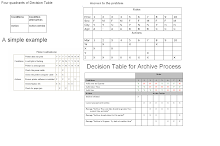
Important image details for the Decision tables
Risk Management
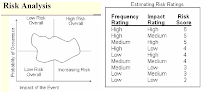
Risk Management